Mooncell Media Player Guide: MB Series vs MC-C2 Server, LEDmagic App & Cloud Publishing (2026)
A Mooncell media player is how an LED screen plays content without a computer: schedules, videos, weather and text run from a dedicated box, managed remotely over the network or the cloud. Mooncell’s asynchronous line spans three tiers — MB series playback boxes, MP series cloud players, and the MC-C2 multimedia server — all operated through the LEDmagic software family. This guide maps the tiers, the software, and how to pick the right one for a digital signage project.
Quick answer: a single shop window or pole screen → MB series box; a multi-site signage network managed from one office → MP series cloud players; a synchronized multi-screen venue (KTV chain, bar, broadcast-style wall) → the MC-C2 server. Everything is controlled with LEDmagic, free from the official download center.
Synchronous vs Asynchronous: The 30-Second Decision
Synchronous systems (processors like the MVB12E) need a live video source — a PC, switcher or camera — feeding the screen in real time. Asynchronous systems play preloaded content from a player box: no PC on site, no cable run from a control room, and the content changes over the network.
Choose asynchronous when: the content changes on a schedule rather than live (advertising, menus, information boards); the site has no room or budget for a PC; or one operator manages many screens in different locations. Choose synchronous when the screen shows live video, events, or content that changes second by second. Many permanent installations combine both — which is why our outdoor LED display projects are specced screen-by-screen, not with one blanket answer.
The Mooncell Async Product Map
| Tier | Models | Role | Capacity / Notes |
|---|---|---|---|
| Playback boxes | MB1 / MB2 / MB4 / MB6 | Standalone async player in the cabinet | MB4: 1.3M px; MB6: 2.3M px — 4-core CPU + 4-core GPU class with gamma adjustment, multi-window, HDMI loop-out and audio |
| Cloud players | MP1 / MP2 / MP401 | Network-first players for remote cluster control | MP1: 0.65M px; MP2: 1.3M px; MP401: 4K HDMI output |
| Multimedia server | MC-C2 (plus MC4K-2, MC4K Pro, MC8K-2) | Server-class synchronized playback | Professional graphics cards + 8K hardware decoding, Server C2 broadcast software |
| Linkage boxes | K series, KA series, MC75E/MBR16 | Scene-linked control for KTV/bar environments | Unifies screen, lighting and music scheduling |
All of these drive the same A-series receiving cards (for example the A10X) — the player tier is about content management, not pixel driving. One special member of the family is the MB400S: an 8-core networked player built for custom-shaped screens, covered in our creative displays guide.
MB Series Playback Boxes
The MB series is the workhorse of single-screen digital signage. It is a compact box with a 4-core CPU + 4-core GPU that stores the program library locally and drives the screen on a schedule. The MB4 (1.3M px) and MB6 (2.3M px) are the most common sizes; both include independent gamma adjustment, multi-window display, HDMI loop-out and audio transmission — everything a shop window, lobby or information board needs.
The complete MB1/MB2/MB4/MB6 asynchronous controller tutorial — mounting, wiring and first publishing.
The standard MB-series commissioning flow, the way we run it at the factory:
- Wire it. Ethernet from the player to the first cabinet’s receiving card (the chain continues cabinet to cabinet). The HDMI loop-out feeds a local monitor for on-site preview; audio runs through the player’s audio output.
- Install LEDmagic from the official download center’s “Asynchronous software” category, and connect the PC to the player over LAN.
- Build the program. In the LEDmagic editor, add your media — video, images, text, weather, clocks — and lay out the windows (the MB series supports multi-window playback with independent gamma adjustment per window).
- Schedule it. Set playback windows and power on/off scheduling so the screen runs itself.
- Publish and check. Send the program to the player, verify playback on the screen, then check the player’s clock and time zone — a wrong clock is the #1 reason a schedule ‘does not work’.
Rough public pricing (verified retailer listings, August 2026): the MP1-class entry boxes street around $139.95; MB-series pricing varies by capacity tier. For exact numbers, see the street-price table in our Mooncell lineup guide.
MP Series Cloud Players
The MP series is the same idea, rebuilt for networks: the MP401 is a networked media player with 4K HDMI output that supports remote cluster control over the internet — one operator publishing to many screens from a central office (official MP series page). The MP1 (0.65M px) and MP2 (1.3M px) cover smaller screens in the same network. If your signage spans multiple cities, this is the tier you want — a PC-less site with phone-app management.
MC-C2 Server: When a Playback Box Isn’t Enough
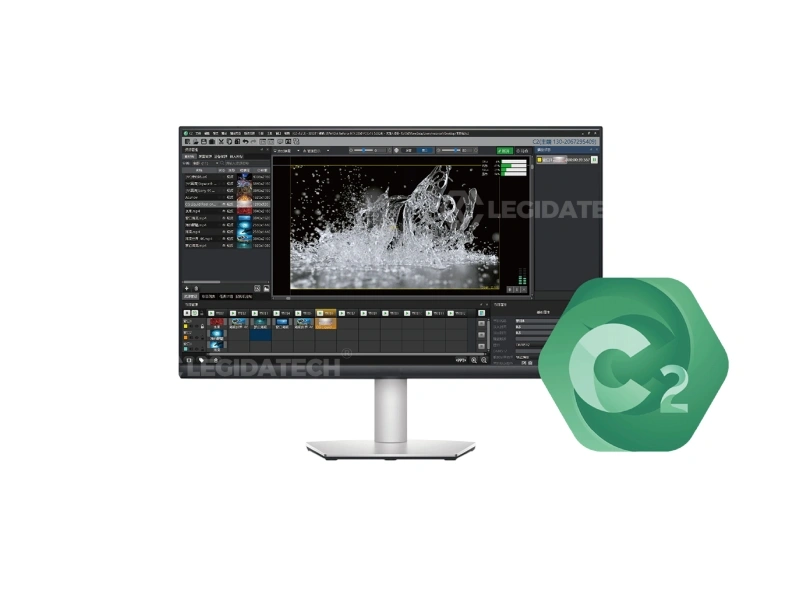
The MC-C2 — when the job stops being ‘one screen, one playlist’ and becomes a synchronized multi-screen show.
Upgrade from a playback box to the MC-C2 multimedia server when any of these is true:
- Multiple screens must play in sync (KTV chain, bar with wall + ceiling, lobby with several zones)
- Content is 8K or heavy multi-window — the MC-C2’s professional graphics cards decode it in hardware
- The venue needs broadcast-style control: scene switching, window zoning, scheduled shows — run by the Server C2 software (current release 5.2.5, see our Mooncell software guide)
The MC LED Player broadcasting software in action — scene windows and synchronized playback.
LEDmagic: Editing, Scheduling & Cloud Publishing
LEDmagic is the software that runs the whole async family: a desktop editor for building programs (images, video, text, weather, clocks), a scheduler for playback windows, and a mobile app (Apple App Store) for managing players from a phone. The official download center lists it under “Asynchronous software” and “Media Player” — free, like all Mooncell software.
An LEDmagic tutorial on a real screen — note that LEDmagic drives creative shapes too, not just rectangles.
For the full software workflow — downloads, versions and the ten most common fixes — see our dedicated Mooncell software guide.
Choosing: Playback Box vs Cloud Player vs Server
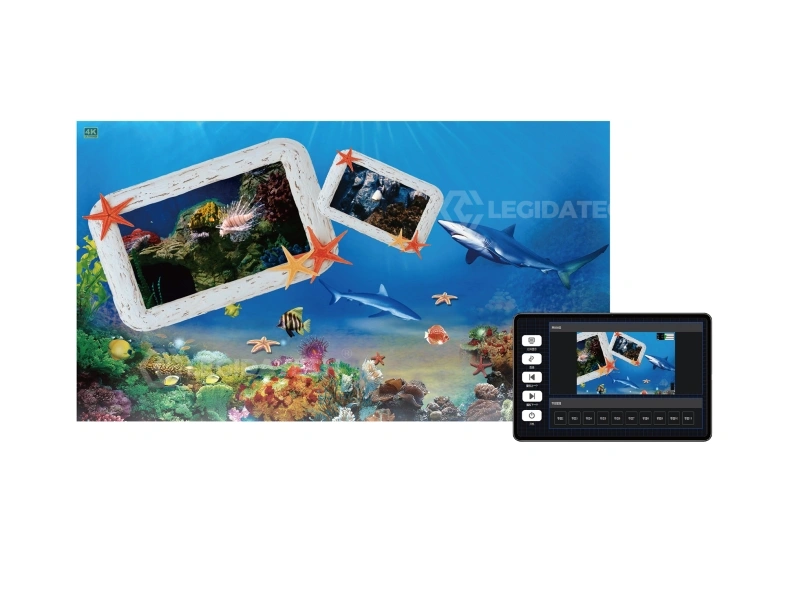
A typical server-class application: synchronized wall and ceiling screens in a bar.
- One screen, one location, standard content → MB series box. The lowest-cost honest choice for a foldable LED poster or single shop display.
- Many screens, many locations → MP series cloud players. Central publishing, phone management, no site PCs — the architecture behind most outdoor LED advertising networks.
- Multi-screen sync or 8K venue content → MC-C2 server. KTV chains, bars, immersive spaces.
- Conference-room style all-in-one → the all-in-one LED display route, where the player is integrated and the buyer never touches configuration.
If you are also weighing brands for async signage, the honest cross-brand view: Huidu’s async ecosystem (HDPlayer software, wide app support) is the most established in digital signage — see our Huidu HDPlayer guide — while Mooncell’s async strength is scene linkage (K/KT series) and the MC-C2’s broadcast-class server. And for the full three-brand hardware comparison, start with Mooncell vs NovaStar vs Colorlight.
Worked Example: A 12-Screen Retail Network Across 3 Cities
Say a retail brand has 12 shop-window screens in three cities, each screen about 0.5M pixels, and one marketing office. The async build: an MP2-class cloud player per site (1.3M px headroom per screen), LEDmagic cloud publishing from the office, and the LEDmagic mobile app for the field team. One operator publishes the monthly campaign to all 12 screens in one action; each store’s manager approves locally. No PCs on site, no visits for content changes. This is the architecture where the MP tier pays for itself in the first quarter — versus dispatching a technician with a USB stick to 12 stores.
If those same 12 screens were in a single KTV chain with synchronized ceiling and wall content per room, the build changes completely: one MC-C2 server per venue broadcasting to every room, which is where the server tier replaces the cloud-player tier.
How We Deploy Mooncell Async Systems
At LEGIDATECH we ship Mooncell async systems as part of complete signage projects: the player tier matched to the pixel count, LEDmagic preloaded with the customer’s first program, cloud publishing tested end-to-end before the container leaves, and remote support after. A signage network that spans cities is exactly the kind of project where “the software works before it ships” is worth more than any spec sheet — and it is the standard we build to.
FAQ: Mooncell Media Players & Async Control
What is a Mooncell media player?
An asynchronous playback device that stores and plays content (video, images, text, schedules) without a PC. It drives the LED screen directly through Mooncell receiving cards and is managed with the LEDmagic software.
What is the difference between the MB series and the MP series?
MB series boxes are standalone local players — content is loaded over LAN or USB and played from the box. MP series players are cloud-first network devices: remote cluster control over the internet, with the MP401 adding 4K HDMI output.
Which MB model fits my screen size?
Match the box’s pixel capacity to your wall: the MB4 drives up to 1.3 million pixels, the MB6 up to 2.3 million. For smaller screens the MB1/MB2 class is sufficient — check your wall’s total pixel count first.
Is LEDmagic free?
Yes. The LEDmagic desktop editor and mobile app are free, distributed from the official Mooncell download center — no license fees.
Can I control a Mooncell player from my phone?
Yes. The LEDmagic mobile app (Apple App Store) manages Mooncell network media players remotely: screen management, program editing, system settings and the media library.
When do I need the MC-C2 server instead of a playback box?
When several screens must play in sync, when content is 8K or heavy multi-window, or when the venue needs broadcast-style scene control. A single standard screen does not need a server.
Can Mooncell players publish content over the internet?
Yes — the MP series is built for it: remote cluster control lets one operator publish to many players across the internet, which is the standard model for multi-city signage networks.
Do Mooncell players work with any LED screen?
The player connects to Mooncell receiving cards — the ecosystem rule applies as with every control brand. The screen cabinets themselves can be any standard LED cabinet with Mooncell cards inside.
Mooncell vs Huidu for asynchronous signage — which is better?
For pure digital signage scale, Huidu’s async ecosystem (HDPlayer software, broad app support) is the most established. Mooncell wins when the project adds scene linkage (KTV/bar) or needs the MC-C2’s server-class synchronized playback. We integrate both and recommend per project.
Does LEGIDATECH supply Mooncell-based digital signage?
Yes — complete signage systems: screen, player, software preloaded and cloud publishing tested before shipping, with remote support after. Tell us the number of screens and locations, and we spec the player tier for each.
Sources & References
- Mooncell MP series official page (MP401 cloud player)
- Mooncell MC-C2 series official page
- Mooncell K series official page
- Mooncell MC75E/MBR16 official page
- Mooncell download center — Asynchronous software
- Mooncell official download center
- Mooncell official tutorial videos
Explore the Mooncell LED Control System Hub
For the complete Mooncell picture — product overview, comparison table, applications, selection logic and FAQs — visit the Mooncell LED Control System: Complete Guide & Product Hub.