


NovaStar MCTRL R5 LED Display Controller — 4K Independent Sending Box with Free-Angle Image Rotation
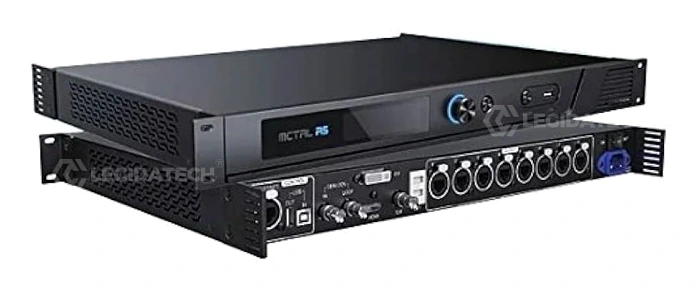
A single MCTRL R5 unit drives up to 3840×1080@60Hz across 8 Gigabit Ethernet ports and 2× 10G optical fiber outputs. It is the first independent NovaStar controller to support 360° image rotation, with Genlock, pixel-level calibration, and up to 8-device cascading — built for rental stages, broadcast studios, and large-scale fixed installations.
Pixel Capacity
Free Rotation
Low Power
Cascading
What Is the NovaStar MCTRL R5 LED Display Controller?
The NovaStar MCTRL R5 LED Display Controller is the first independent LED sending box developed by Xi’an NovaStar Tech Co., Ltd. to support free-angle image rotation. A single MCTRL R5 unit features a load capacity of up to 3840×1080@60Hz (4.14 million pixels), supporting any custom resolution within this ceiling — making it the go-to choice for ultra-wide and ultra-long LED display configurations in both rental staging and fixed installation environments.
Designed to pair with NovaStar’s A8s or A10s Pro receiving cards and SmartLCT software, the MCTRL R5 enables full 360° cabinet-level and screen-level rotation. The onboard G4 engine delivers flicker-free image output with adaptive frame rate control, while pixel-level brightness and chroma calibration ensures ±1% color uniformity across every individual LED — a critical specification for broadcast, XR virtual production, and high-end rental applications where camera-readiness is non-negotiable.
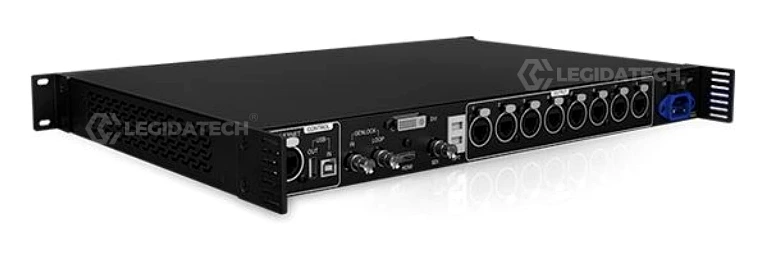
At just 25W rated power consumption and a compact 1U-compatible chassis (482.6 × 334.6 × 52.0 mm, 4.3 kg), the MCTRL R5 balances industrial-grade reliability with energy efficiency. With 8× RJ45 Gigabit Ethernet ports (650,000 pixels per port at 8-bit) and 2× 10G optical fiber outputs — plus support for up to 8-device cascading — this controller scales seamlessly from single-screen deployments to stadium-level multi-wall installations.
As a leading LED screen manufacturer, Legida Tech integrates the MCTRL R5 into turnkey LED display solutions — factory pre-configured, 72-hour burn-in tested, and shipped globally with full technical support.
Max Resolution @60Hz
Ethernet + Fiber Output Ports
Free-Angle Image Rotation
Rated Power Consumption
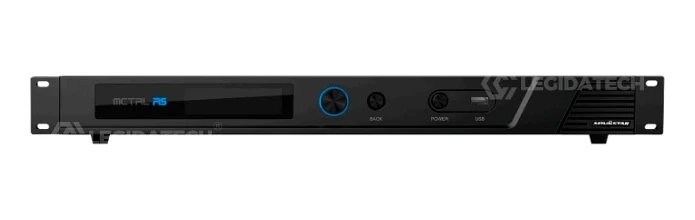
Key Features of the NovaStar MCTRL R5 LED Display Controller
Triple-Input Connectivity: HDMI 1.4 + DL-DVI + 6G-SDI
The MCTRL R5 accepts three independent video input formats simultaneously: 1× HDMI 1.4 (supporting HDCP 1.4 and custom resolutions up to 3840×1080@60Hz), 1× Dual-Link DVI (8-bit RGB 4:4:4 at full 3840×1080@60Hz), and 1× 6G-SDI (broadcast-grade input with max 3840×1080@60Hz). This triple-input architecture eliminates the need for external format converters in multi-source environments such as live concerts, broadcast OB vans, and security command centers where signal redundancy is mission-critical.
All three inputs support 8-bit and 10-bit video sources (HDMI: RGB 4:4:4, YCbCr 4:4:4, YCbCr 4:2:2; DVI: RGB 4:4:4), with 24 preset standard resolutions ranging from 1024×768 to 3840×1080 across refresh rates from 24Hz to 120Hz. Interlaced signals are not supported on any input.
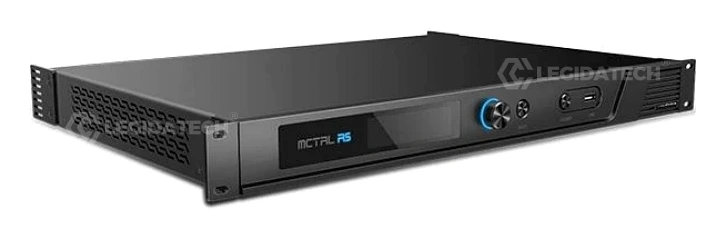
Free-Angle Image Rotation — The Industry-First Independent Controller
The MCTRL R5 was NovaStar’s first independent controller to support display rotation at any angle. Two rotation modes are available: Port Rotation (individual rotation of cabinets loaded by each Ethernet port) and Screen Rotation (global rotation of the entire LED display). When paired with A8s or A10s Pro receiving cards and SmartLCT V3.4.0+, users can configure rotation both from the controller’s front-panel OLED menu and the PC software — enabling creative installations such as angled stage backdrops, curved architectural screens, and immersive 360° wrap-around displays.
Constraint note: 10-bit input sources do not support image rotation. Screen configuration must be completed on the MCTRL R5 or in SmartLCT before rotation settings are applied. The rotation function is automatically disabled when the calibration function is active.
Pixel-Level Brightness & Chroma Calibration
Working with NovaLCT and NovaCLB calibration software, the MCTRL R5 performs per-pixel brightness and chroma calibration on every LED. This removes brightness deviations and color differences across the entire screen surface, achieving high brightness consistency (±1% tolerance) and uniform color temperature. The calibration data is saved directly to the receiving card’s non-volatile memory, ensuring it persists across power cycles. This feature is essential for applications demanding uncompromised image quality: broadcast studios, corporate lobbies, museum exhibits, and high-end retail displays where color accuracy directly impacts brand perception.
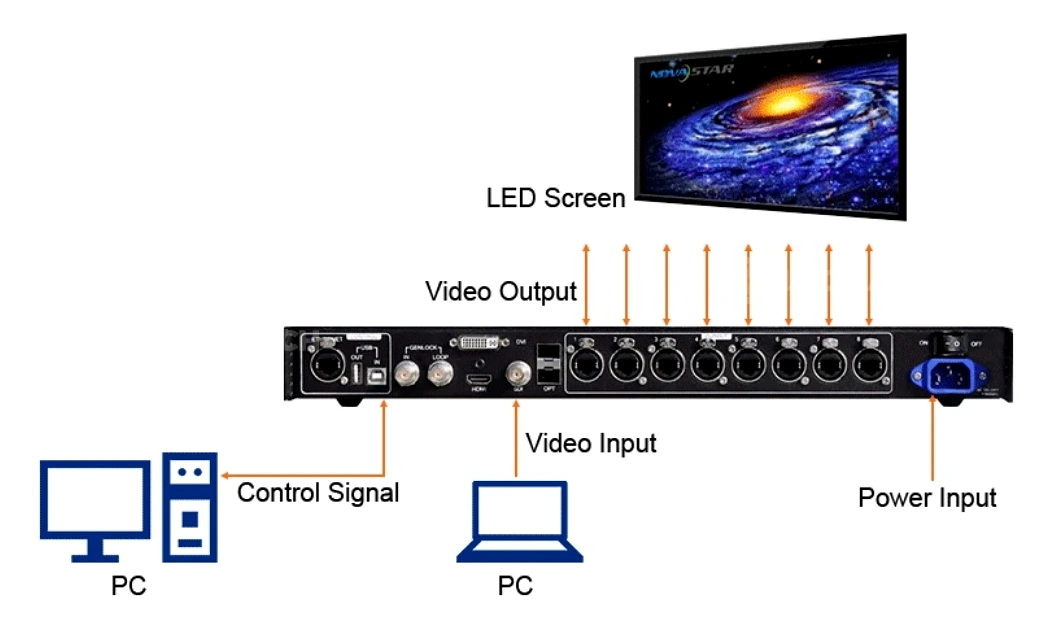
Up to 8-Device Cascading for Large-Scale Installations
A single MCTRL R5 supports up to 4.14 million pixels. For installations exceeding this capacity — such as stadium perimeter displays, mega-concert screens, or building-wrap LED facades — up to 8 MCTRL R5 units can be cascaded via USB IN/OUT ports for synchronized operation. Each Ethernet port supports redundancy mode between ports, and the dual 10G optical fiber outputs (OPT1 as primary, OPT2 as mirror/backup of OPT1) provide long-distance signal transmission with automatic failover protection.
NovaStar G4 Engine: Flicker-Free Display & Rapid Stage Preparation
The MCTRL R5 is built on NovaStar’s G4 processing engine, which eliminates image flickering and visible scanning lines even during rapid content transitions. The intelligent architectural design enables 3-step quick screen configuration directly from the front-panel OLED and knob interface: (1) Set Input Source → (2) Set Input Resolution → (3) Quick Screen Config. This substantially reduces on-site setup time for rental and staging crews. Additionally, the controller supports Genlock synchronization (Bi-Level, Tri-Level, and Black Burst) via dedicated IN-LOOP BNC connectors — essential for multi-camera broadcast environments where screen tearing is unacceptable.
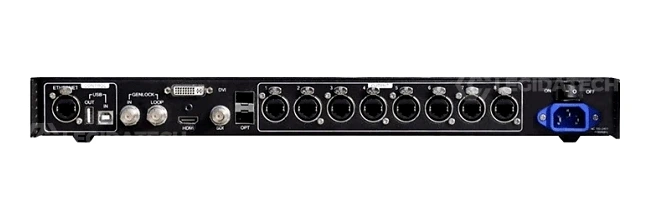
USB Firmware Update & Comprehensive Redundancy
Firmware updates are performed via the front-panel USB port using a USB drive — no PC connection required. This enables field firmware upgrades without dismantling the control rack. The MCTRL R5 also supports input backup (auto-switch to a secondary input source upon signal loss), Ethernet port redundancy between all 8 RJ45 outputs, and optical output mirroring (OPT2 as the copy channel of OPT1). Up to 10 configuration presets can be saved and recalled instantly, ensuring rapid failover in live production environments. The operating temperature range of -20°C to +60°C and storage range of -20°C to +70°C make the MCTRL R5 suitable for both indoor climate-controlled studios and outdoor rental deployments in extreme weather conditions.
NovaStar MCTRL R5 Technical Specifications
Electrical Specifications
| Input Voltage | AC 100V–240V, 50/60Hz |
| Rated Power Consumption | 25W |
Operating Environment
| Temperature | -20°C to +60°C (-4°F to +140°F) |
| Humidity | 10% RH to 90% RH, non-condensing |
| Storage Temperature | -20°C to +70°C (-4°F to +158°F) |
Physical Specifications
| Dimensions (W×D×H) | 482.6 × 334.6 × 52.0 mm (19.0 × 13.2 × 2.0 in) |
| Net Weight | 4.3 kg (9.5 lbs) |
| Packing Box | 560 × 405 × 180 mm |
| Carrying Case | 545 × 380 × 145 mm |
| Included Accessories | 1× Power Cord, 1× Ethernet Cable, 1× USB Cable, 1× HDMI Cable, 1× DVI Cable |
Input & Output Connectors
| Connector | Type | Max Resolution / Capacity | Notes |
|---|---|---|---|
| HDMI 1.4 | Input | 3840×1080@60Hz | HDCP 1.4, 8/10-bit, custom resolutions |
| DL-DVI | Input | 3840×1080@60Hz | 8-bit RGB 4:4:4 only |
| 6G-SDI | Input | 3840×1080@60Hz | No resolution/bit depth config |
| RJ45 ×8 | Output | 650,000 px/port (8-bit) 325,000 px/port (10-bit) | Gigabit Ethernet, redundancy |
| OPT1-OPT2 | Output | 10G Optical | OPT2 = mirror of OPT1 |
| ETHERNET | Control | — | Connect to control PC |
| USB IN-OUT | Control | — | Cascading (up to 8 devices) |
| GENLOCK IN-LOOP | Control | — | Bi-Level, Tri-Level, Black Burst |
Video Source Bit Depth & Sampling
| Input | Bit Depth | Sampling Format | Max Input Resolution |
|---|---|---|---|
| HDMI 1.4 | 8-bit | RGB 4:4:4 / YCbCr 4:4:4 / YCbCr 4:2:2 | 3840×1080@60Hz |
| 10-bit | RGB 4:4:4 / YCbCr 4:4:4 / YCbCr 4:2:2 | 2048×1152@60Hz | |
| DL-DVI | 8-bit | RGB 4:4:4 | 3840×1080@60Hz |
| 6G-SDI | — | — | 3840×1080@60Hz |
How Free-Angle Image Rotation Works on the MCTRL R5
The MCTRL R5’s rotation capability is its defining competitive advantage in the NovaStar MCTRL R5 LED Display Controller lineup. Unlike all-in-one video processors that apply rotation globally at the processor level, the R5 distributes rotation computation to individual receiving cards (A8s/A10s Pro), enabling both port-level and screen-level rotation with independent angle settings for each cabinet group.
Port Rotation
Each Ethernet port’s loaded cabinets rotate independently according to a configured angle. Suitable for creative LED installations where different screen sections require different orientations — such as pyramidal stage designs, angled ceiling displays, or wave-shaped architectural facades.
Screen Rotation
The entire LED display rotates as one unit according to a single angle. Ideal for installations where the physical screen is mounted at a fixed tilt — portrait-mode digital signage columns, tilted stadium fascia boards, or overhead ceiling-mounted screens in retail environments.
Rotation Configuration Workflow:
- Configure the LED screen either on the MCTRL R5 LCD menu or in SmartLCT.
- Navigate to Rotation Settings → Rotation Enable → Enable.
- Select Port Rotate or Screen Rotate and set the rotation step and angle.
- Apply settings — the display output rotates instantly.
- 10-bit input sources do not support image rotation.
- Rotation function is disabled when calibration is active.
- The screen must be configured on the MCTRL R5 before rotation can be set.
- SmartLCT V3.4.0 or later is required for PC-side rotation configuration.
How to Configure the MCTRL R5 in 3 Steps
The MCTRL R5 is designed for rapid on-site deployment. Following the built-in menu workflow, operators can light up an LED screen in under 5 minutes. For detailed software configuration guides, see our NovaStar software download center.
Set Input Source
Press the front knob → Input Settings → Input Source → Select SDI, DVI, or HDMI. Only one source is active at a time. SDI sources do not support preset or custom resolution settings.
Set Input Resolution
Method A: Select a preset resolution (14 standard options from 1024×768 to 3840×1080).
Method B: Customize width, height, and refresh rate via Input Settings → Custom Resolution.
Quick Screen Configuration
Screen Settings → Quick Config → Set Cabinet Row Qty, Cabinet Column Qty, Port 1 Cabinet Qty, and Data Flow direction. For irregular screens, use NovaLCT software.
Compatible NovaStar Receiving Cards & Software
The MCTRL R5 works within the broader NovaStar LED control ecosystem. For optimal performance — including full rotation, calibration, and Genlock support — we recommend pairing the MCTRL R5 with the following components:
Recommended Receiving Cards
- A8s — Standard synchronous receiving card
- A10s Pro — 5G-ready with advanced calibration
- MRV300 / MRV330 — Fixed installation series
- MRV366 / MRV410 — Rental & stage series
- MRV560-1 — High-density small-pixel series
Required Software
- NovaLCT V5.2.0+ — Standard configuration tool
- SmartLCT V3.4.0+ — Building-block config with rotation support
- NovaCLB — Brightness & chroma calibration
- VNNOX — Cloud-based remote management (via compatible media players)
While the MCTRL R5 is primarily designed for NovaStar’s receiver card ecosystem, it may function with select third-party receiving cards — though rotation, calibration, and redundancy features are only guaranteed with official NovaStar hardware. For alternative control system options, see our comparison of Huidu control systems and Linsn LED controllers.
For calculating the correct number of receiving cards for your screen size, refer to our guide on receiving card and sending card quantity calculation.
MCTRL R5 vs MCTRL 4K vs MCTRL 660 Pro — Which NovaStar Controller Fits Your Project?
NovaStar offers multiple independent LED display controllers targeting different market segments. Below is a data-driven comparison to help procurement managers and system integrators select the correct model:
| Specification | MCTRL R5 | MCTRL 4K | MCTRL 660 Pro |
|---|---|---|---|
| Max Loading Capacity | 4,140,000 px | 8,800,000 px | 2,300,000 px |
| Input Connectors | HDMI 1.4 + DL-DVI + 6G-SDI | DP 1.2 + HDMI 2.0 + 2× DL-DVI | DVI + HDMI + 3G-SDI (all with LOOP) |
| Ethernet Outputs | 8× 1GbE RJ45 | 16× 1GbE RJ45 | 6× 1GbE RJ45 |
| Optical Outputs | 2× 10G OPT | 4× 10G OPT | 2× 10G OPT |
| Image Rotation | ✅ Yes (any angle) | ✅ Yes | ❌ No |
| Genlock | IN-LOOP (Bi/Tri-Level, Black Burst) | ✅ Yes (offset adjustable) | ❌ No |
| 10-bit Support | ✅ Yes (HDMI & SDI) | ✅ Yes | ❌ 8-bit only |
| Max Cascading | 8 devices | 8 devices | 8 devices |
| Power Consumption | 25W | 35W | 20W |
| Weight | 4.3 kg | 4.5 kg | 3.2 kg |
| Best For | Rental stages, creative rotation displays, mid-to-large fixed installations | 4K LED walls, broadcast studios, large-scale fixed installations | Budget projects, small-to-mid fixed signage, entry-level rental |
Where Is the NovaStar MCTRL R5 Used?
The MCTRL R5’s combination of rotation capability, Genlock support, triple-input connectivity, and compact 1U form factor makes it the preferred choice across six core application verticals:
Concerts & Live Events
Rotation enables angled IMAG screens. 3-step quick config reduces stage prep. Genlock syncs with broadcast cameras.
Security Monitoring Centers
Triple-input redundancy (HDMI + DVI + SDI). 24/7 operation rated at -20°C to +60°C. Cascading for multi-wall video walls.
Sports Centers & Stadiums
8-device cascading drives mega-displays. 10G optical outputs for long-distance runs. Pixel calibration ensures uniform color.
Stage Rental & Touring
Compact 4.3 kg chassis. Quick setup workflow. Firmware update via USB. See our rental LED solutions.
XR Virtual Production
Genlock + Shutter Fit via A10s Pro. Pixel calibration for camera-ready color accuracy. Low latency G4 engine output.
Fixed Installation (DOOH)
25W power consumption. Ethernet redundancy. 10 preset configurations for scheduled content changes. IP-based remote monitoring.
Why Source Your MCTRL R5 from Legida Tech?
As a factory-direct LED screen manufacturer, Legida Tech provides the NovaStar MCTRL R5 LED Display Controller as part of complete, pre-configured LED display systems. Every controller undergoes integrated system testing before shipment — not just standalone unit checks.
Every MCTRL R5 + receiving card + module combo tested at full load for 72 continuous hours before packing.
Authorized NovaStar distributor — guaranteed genuine hardware with original firmware and full warranty.
MCTRL R5 arrives pre-loaded with your cabinet configuration file (.rcfgx) — plug in and power on.
DDP shipping to 80+ countries with full customs documentation and on-site technical support available.
NovaStar MCTRL R5 — Frequently Asked Questions
Q1: What is the maximum loading capacity of the MCTRL R5?
The MCTRL R5 supports a maximum loading capacity of 3840×1080@60Hz (4,147,200 pixels) for a single unit. Per Ethernet port, the capacity is 650,000 pixels at 8-bit and 325,000 pixels at 10-bit. Custom resolutions within this ceiling are fully supported, including ultra-wide formats such as 2560×816@120Hz and ultra-tall formats such as 800×3840@60Hz.
Q2: Does the MCTRL R5 support 10-bit video sources?
Yes — the HDMI 1.4 input supports both 8-bit (RGB 4:4:4, YCbCr 4:4:4, YCbCr 4:2:2 at up to 3840×1080@60Hz) and 10-bit (same formats at up to 2048×1152@60Hz). However, note that 10-bit input does not support image rotation, and 10-bit sources are not supported when the calibration function is enabled.
Q3: How many MCTRL R5 units can be cascaded together?
Up to 8 MCTRL R5 devices can be cascaded via USB IN/OUT ports for synchronized multi-controller operation. Each unit must be connected in sequence: PC → USB IN of Device 1 → USB OUT to USB IN of Device 2 → … up to Device 8. This configuration supports display resolutions well beyond 8K for stadium-scale LED installations.
Q4: What receiving cards are compatible with the MCTRL R5?
For full functionality (rotation, calibration, Genlock), the MCTRL R5 is designed to pair with A8s and A10s Pro receiving cards. It is also compatible with the broader NovaStar receiving card lineup including MRV300, MRV330, MRV366, MRV410, and MRV560-1 — though advanced features may be limited on older card models. For information on receiving card and sending card quantity calculation, see our guide.
Q5: How do I update the MCTRL R5 firmware?
There are two methods: (1) USB Drive: Copy the firmware package to a USB drive, insert into the front-panel USB port, and follow the OLED menu prompts. (2) PC Software: Connect via USB to a computer running NovaLCT V5.2.0+ (User → Advanced Synchronous System User Login → enter password → type “admin” → Browse for firmware → Update) or SmartLCT V3.4.0+ (V-Sender → Firmware Upgrade → select program path → Update). Do not disconnect the device during the update process.
Q6: Does the MCTRL R5 support Genlock for broadcast applications?
Yes. The MCTRL R5 features a dedicated GENLOCK IN-LOOP BNC connector pair that accepts Bi-Level, Tri-Level, and Black Burst sync signals. The IN port receives the external sync signal; the LOOP port passes it through to downstream devices. This ensures frame-accurate synchronization between the LED display and broadcast cameras — essential for live TV production, esports broadcasting, and XR virtual production stages.
Q7: What is the difference between Port Rotation and Screen Rotation?
Port Rotation applies a unique rotation angle to cabinets loaded by each individual Ethernet port — ideal for creative installations where different screen sections require different orientations. Screen Rotation applies a single uniform rotation angle to the entire LED display — suitable for installations where the physical screen is mounted at a fixed tilt angle. Both modes support continuous angle adjustment at any increment.
Q8: Can the MCTRL R5 be used for XR virtual production?
Yes. When paired with A10s Pro receiving cards, the MCTRL R5 supports Genlock synchronization and Shutter Fit technology — two critical requirements for camera-ready LED volumes in XR and film production. The G4 engine’s low-latency processing combined with pixel-level chroma calibration ensures the LED backdrop renders accurate, flicker-free visuals even at high camera shutter speeds. However, for native 4K (3840×2160) XR volumes, consider the higher-capacity MCTRL 4K or NovaStar MX40 Pro COEX series.
LED Display Controller Selection Guide: Independent Sending Card vs All-in-One Video Processor — A B2B Buyer’s Technical Framework
Published: July 2026 | Reading Time: ~14 minutes | By Legida Tech Engineering Team
1. Understanding LED Display Controller Architecture: The Sending Card + Receiving Card Model
Every synchronous LED display system operates on a two-tier control architecture. The sending card (or “sending box” / “independent controller”) resides at the video source end — typically installed in a control PC or housed as a standalone 1U rack unit like the NovaStar MCTRL R5 LED Display Controller. Its function is to ingest video signals from HDMI, DVI, DP, or SDI sources, convert them into a proprietary data protocol, and distribute pixel data across Ethernet (CAT5e/CAT6) or optical fiber cables to the display.
At the display end, each LED cabinet or module contains a receiving card — such as the NovaStar A8s or A10s Pro — which decodes the incoming data stream and drives individual LED driver ICs. The sending card determines the maximum pixel capacity of the system; the receiving card determines per-cabinet resolution and refresh rate. A single MCTRL R5 sending box can drive up to 4.14 million pixels across 8 Ethernet ports, with per-port capacity of 650,000 pixels (8-bit) or 325,000 pixels (10-bit).
Understanding this architecture is critical for procurement decisions: an undersized sending card creates a bottleneck regardless of receiving card quality. For a comprehensive breakdown of how many cards your project requires, see our guide on receiving card and sending card quantity calculation.
2. Independent Controller vs All-in-One Video Processor: When to Choose Each
The LED control hardware market segments into two primary product categories: independent controllers (sending boxes like the MCTRL R5, MCTRL 4K, MCTRL 660 Pro) and all-in-one video processors (VX series, MX Pro series, COEX series, TU series). The distinction matters because it directly affects system cost, complexity, and operational flexibility.
| Decision Factor | Independent Controller (MCTRL R5) | All-in-One Processor (VX1000 / MX40 Pro) |
|---|---|---|
| Video Scaling | Requires external scaler or media server | Built-in scaling engine with PIP/POP |
| Multi-Source Switching | Single active input (manual switch) | Seamless switching between 4–8 sources |
| Cost (Typical B2B) | $300–$500 per unit | $800–$3,500 per unit |
| Rotation Support | ✅ Native (MCTRL R5 / MCTRL 4K) | Varies — most VX series do NOT support rotation |
| Best Application | Single-source fixed/rental with external video management | Multi-source live events, broadcast, complex PIP layouts |
For B2B buyers, the decision often comes down to this: if your content workflow already includes a media server (Resolume, MadMapper, Watchout) or a video switcher (Blackmagic ATEM, Roland V-series), an independent controller like the MCTRL R5 provides better value — you are not paying for redundant scaling hardware. If you need an all-in-one box that handles scaling, switching, and sending in a single 1U/2U chassis, the VX or MX series is the correct choice. Explore our full LED video wall controller guide for a comprehensive comparison.
3. Key Technical Specifications That Directly Impact Your ROI
When evaluating any LED display controller, five technical parameters have a measurable effect on total cost of ownership and display performance. These are the specifications that separate enterprise-grade controllers from entry-level hardware:
Pixel Loading Capacity: Measured in total pixels supported at 60Hz. The MCTRL R5 handles 4.14 million pixels — enough to drive a 1920×1080 (Full HD) display with spare capacity, or a 3840×1080 ultra-wide configuration. Exceeding the rated capacity causes frame drops and signal instability. Always factor in at least 15% headroom for future expansion.
Bit Depth: 8-bit controllers produce 16.7 million colors with 256 brightness levels per channel — sufficient for most commercial signage. 10-bit controllers produce 1.07 billion colors with 1024 levels per channel, eliminating visible color banding in smooth gradients and HDR content. The MCTRL R5 supports both, with the caveat that rotation and calibration features are restricted at 10-bit.
Ethernet Port Capacity: Each RJ45 Gigabit Ethernet port on the MCTRL R5 handles 650,000 pixels at 8-bit. For a P3.91 outdoor LED module (64×64 pixels per module), a single port can drive approximately 158 modules. Understanding per-port capacity is essential for calculating the LED display driver IC configuration and cabling topology.
Genlock Support: For any installation that will be photographed or filmed — broadcast studios, XR stages, corporate event venues — Genlock is non-negotiable. Without it, the LED display and camera shutter operate at different refresh cycles, producing visible horizontal bands (moiré) and frame tearing in recorded footage. The MCTRL R5’s dedicated Genlock IN-LOOP BNC ports accept industry-standard Bi-Level, Tri-Level, and Black Burst reference signals.
Operating Temperature Range: The MCTRL R5 is rated for continuous operation from -20°C to +60°C — a 80°C operational window that covers outdoor rental deployments in both winter festivals and summer stadium events. Controllers with narrower thermal envelopes (0°C to +40°C, common in budget hardware) require climate-controlled enclosures, adding hidden cost.
4. The NovaStar Ecosystem: Why Industry Leaders Standardize on One Brand
NovaStar controls an estimated 60–70% market share in the global LED display controller market, with particular dominance in the rental and touring segment (estimated 80%+ share). This near-monopoly in professional applications is not accidental — it results from three structural advantages that directly benefit B2B purchasers:
Interoperability: A NovaStar MCTRL R5 sending card works with any NovaStar receiving card (A-series, MRV-series) regardless of the LED module manufacturer. This means procurement managers are never locked into a single panel supplier — critical for multi-vendor RFPs and phased installations where different batches of cabinets may arrive years apart. For a comparison with alternative ecosystems, see our analyses of Huidu and Linsn systems.
Technician Availability: Because NovaStar dominates the market, LED technicians worldwide are trained on NovaLCT and SmartLCT software. For international rental tours, this ubiquity means local crews can operate your system without manufacturer-specific training — reducing labor costs and setup time at each venue.
Firmware Longevity: NovaStar maintains firmware support for controllers released as far back as 2016 (the MCTRL R5 V1.0.0). The latest V1.0.5 firmware (August 2024) added updated packing dimensions and rear panel refinements. For B2B buyers with 5–10 year depreciation cycles, this commitment to backward compatibility protects the initial hardware investment.
5. Installation & Maintenance Best Practices for LED Display Controllers
Even the most capable controller underperforms if installed incorrectly. Based on field data from hundreds of Legida Tech deployments, here are the practices that maximize controller lifespan and display quality:
Cable Management: CAT6 STP (shielded twisted pair) is strongly recommended over CAT5e for runs exceeding 30 meters. The MCTRL R5’s Gigabit Ethernet outputs carry uncompressed pixel data at ~800 Mbps per port at full load — near the theoretical limit of CAT5e (1 Gbps). Shielded cable prevents electromagnetic interference from stage lighting dimmers, HVAC equipment, and radio microphones that can cause pixel corruption artifacts.
Thermal Management: Although the MCTRL R5 is rated to +60°C, sustained operation above +50°C accelerates electrolytic capacitor degradation in the power supply section. In outdoor fixed installations, mount the controller in a ventilated NEMA-rated enclosure with at least 2U of empty rack space above and below the unit. The 25W power consumption is modest, but heat accumulates quickly in sealed enclosures without active airflow.
Redundancy Configuration: For mission-critical applications (control rooms, 24/7 broadcast, stadium scoreboards), configure both Ethernet port redundancy and input backup. Set a secondary input source (e.g., DVI as backup to HDMI primary) via Advanced Settings → Input Backup. Enable Ethernet redundancy so that if a primary port fails, the backup port takes over within one frame cycle. For power redundancy, the MCTRL R5 itself does not feature dual PSU — consider an external ATS (automatic transfer switch) for the AC supply.
Preventive Maintenance Schedule: Every 6 months: (1) update firmware to the latest stable release, (2) re-export and backup cabinet configuration files (.rcfgx), (3) inspect all RJ45 connectors for bent pins and corrosion, (4) verify Genlock sync by connecting a test signal generator and checking for frame tearing at all supported refresh rates, (5) clean front-panel air intake vents with compressed air. For broader screen longevity strategies, refer to our guide on improving LED display lifespan.
6. Future-Proofing Your LED Display Investment: 2026 and Beyond
The LED display controller market is evolving rapidly. As of 2026, several technology trends are reshaping procurement strategies:
5G Transmission: NovaStar’s COEX 5G series (CX80 Pro, CX40 Pro) has introduced 5GbE transmission that quadruples per-port pixel capacity to 2.59 million pixels (8-bit). While the MCTRL R5 remains on 1GbE infrastructure, its compatibility with the same receiving card ecosystem means a future upgrade to a 5G sending box would not require replacing cabinets — only the controller and possibly the Ethernet switch infrastructure.
HDR and Wide Color Gamut: HDR10 and HLG support is becoming table-stakes for premium installations. The MCTRL R5 supports 10-bit color depth input (a prerequisite for HDR) but lacks native HDR metadata processing — that function resides in upstream video processors or media servers. For HDR-native installations, consider the MX40 Pro or COEX series which handle HDR tone mapping at the controller level.
AV-over-IP and ST 2110: Broadcast facilities are transitioning from baseband SDI to IP-based ST 2110 workflows. The MCTRL R5’s SDI input ensures compatibility with current broadcast infrastructure, but it does not natively support ST 2110. For SMPTE 2110 environments, NovaStar’s H-series modular splicers with ST 2110 input cards are the appropriate choice.
The Bottom Line: The NovaStar MCTRL R5 LED Display Controller occupies a sweet spot in the 2026 controller market — it delivers professional-grade features (rotation, Genlock, 10-bit, calibration) at an independent controller price point ($300–$500), without the cost premium of all-in-one processors. For B2B buyers managing single-source or externally-switched LED displays up to 4.1 million pixels, it represents the optimal balance of capability, reliability, and total cost of ownership. For more on how controller choice affects overall screen pricing, see our analysis of factors affecting LED display screen prices and LED screen power supply and consumption.
This article was written by the Legida Tech Engineering Team — a factory-direct LED screen manufacturer specializing in turnkey NovaStar-based LED display solutions. For technical specifications, pricing, or system design consultation, contact our sales engineers.
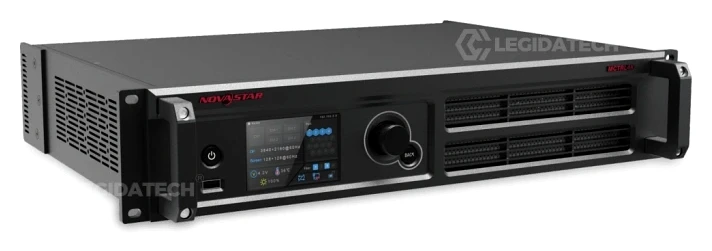
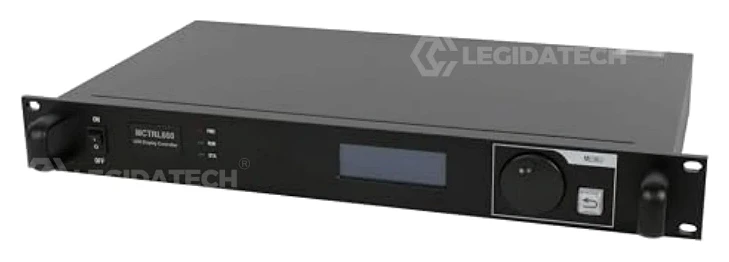
Compare NovaStar LED Display Controllers
Explore the full MCTRL lineup to find the right controller for your pixel count, feature requirements, and budget.
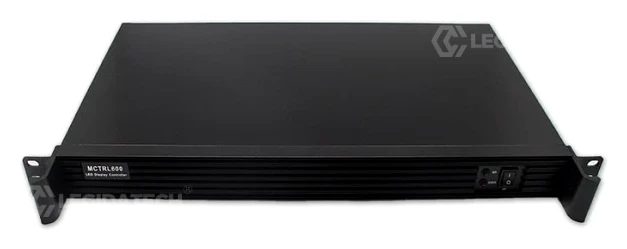
Not sure which controller fits your project? Contact our engineers for a free system design consultation →
Get the NovaStar MCTRL R5 at Factory-Direct Pricing
Pre-configured with your cabinet files. 72-hour burn-in tested. Shipped globally with full documentation. Minimum order: 1 unit for sample evaluation.
Request Factory Price Quote Now →
✅ CE / FCC / RoHS Compliant
✅ 3-Year Warranty
✅ Global DDP Shipping