An LED video wall controller turns a video signal into pixel data the wall can display. It sits between your sources — media player, camera, laptop, broadcast switcher — and the receiving cards inside the cabinets. If the controller is undersized or misconfigured, the wall shows black bars, drops ports, flickers on camera or refuses to show the source at all. This guide explains what the controller does, how it differs from a processor and a sending card, how to calculate pixel load, and how to diagnose the most common problems. For the buying workflow, see our LED video wall controller buying guide.
What Is an LED Video Wall Controller?
The controller is the control layer of an LED display system: it accepts one or more input signals, scales and arranges them into the wall’s native canvas, and distributes the pixel data to receiving cards over Ethernet. It also handles brightness, color, gamma, test patterns and — on higher-end models — window layout, seamless switching and Genlock.
“Controller” is used loosely in the market. Some suppliers mean a full video processor with scaling and multiple inputs; others mean a sending card that only distributes an already-processed signal. Before comparing prices, confirm which category the product belongs to. The three devices are not interchangeable.
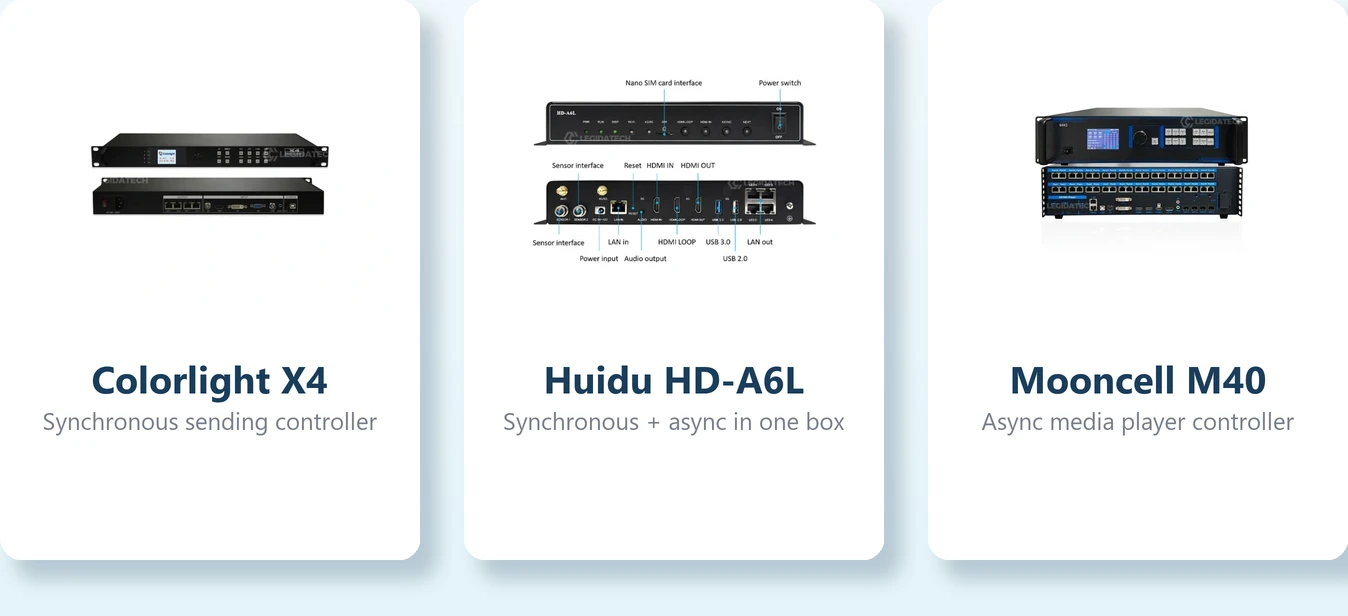
LED video wall controllers — Colorlight X4, Huidu HD-A6L and Mooncell M40 hardware
Controller vs Video Processor vs Sending Card
The three devices solve different parts of the signal chain. A video processor scales, switches and layers sources; a sending card takes one processed signal and distributes it to the wall; an all-in-one controller combines both in one box. Most commercial and rental projects use an all-in-one; fixed single-source walls can use a pure sending card.
| Device | What it does | When you need it |
|---|---|---|
| Video processor | Scales, switches and layers multiple inputs; PIP, seamless switching, color management, Genlock | Multiple sources, live events, broadcast/XR, creative layouts |
| Sending card | Takes one processed signal and distributes pixel data to receiving cards over Ethernet | Single-source fixed installations where the source already matches the wall resolution |
| All-in-one controller | Processor + sending card in one box | Most rental, stage and commercial projects that want one device and simple cabling |
Brands such as NovaStar and Colorlight package these layers differently: some models are pure sending cards, some are all-in-one controllers, and some are full processors. For a brand-level explanation, see our Colorlight control system guide and the Colorlight LED display controller product page.
If a quote says “LED controller” without specifying which of these it is, ask for the model, the input list and the Ethernet port count. That is the only way to compare like with like.
How to Calculate the Pixel Load of Your Wall
The controller must drive every pixel on the wall. Calculate the load before choosing a model:
Pixels = (screen width ÷ pixel pitch) × (screen height ÷ pixel pitch). Use the same unit for width, height and pitch — millimetres are easiest. For a 6 × 3 m wall at P3, that is (6000 ÷ 3) × (3000 ÷ 3) = 2000 × 1000 = 2,000,000 pixels. Add 10–20% headroom for future expansion and for controllers that lose capacity at high refresh or color depth. If you need the wall resolution first, use our LED screen resolution calculator.
Each Gigabit Ethernet output typically carries about 650,000 pixels at 8-bit color; confirm the exact figure for the model, because it drops at higher bit depth or refresh. A 2M-pixel wall therefore needs at least four Ethernet outputs, plus spare capacity. The table below shows typical project sizes.
| Screen | Approximate pixel load | Controller class |
|---|---|---|
| P2.5 indoor, 10 m² | ≈1.6 million | Entry all-in-one or sending card, 2–4 Ethernet ports |
| P3.91 rental wall, 60 cabinets (128 × 128 px each) | ≈0.98 million | Compact sending card or rental-style all-in-one |
| P4 outdoor, 50 m² | ≈3.1 million | Mid-range controller, 6+ Ethernet ports |
| P1.86 fine-pitch, 20 m² | ≈5.8 million | High-end controller, 10+ ports or 10G fiber output |
Ports and Interfaces
The input side decides what sources you can connect; the output side decides how much wall you can drive. A controller with plenty of pixels but too few inputs is just as limiting as an undersized one.
| Interface | Typical use | What to check |
|---|---|---|
| HDMI 2.0 | Laptops, media players, consumer cameras | 4K60 support, HDCP handling, EDID management |
| DisplayPort 1.2/1.4 | Workstations, high-refresh sources | Resolution and refresh at the wall canvas |
| SDI | Broadcast cameras, switchers | 3G/6G/12G support, embedded audio |
| DVI | Legacy sources | Single-link vs dual-link |
| Gigabit Ethernet (RJ45) | Cabinet receiving cards | Port count and pixel capacity per port |
| Fiber | Long-distance runs, large walls | 10G capacity, SFP type, redundancy |
| Genlock / BNC | Camera and broadcast sync | Genlock input and loop-through |
| USB / network | Configuration and monitoring | Software compatibility and remote access |
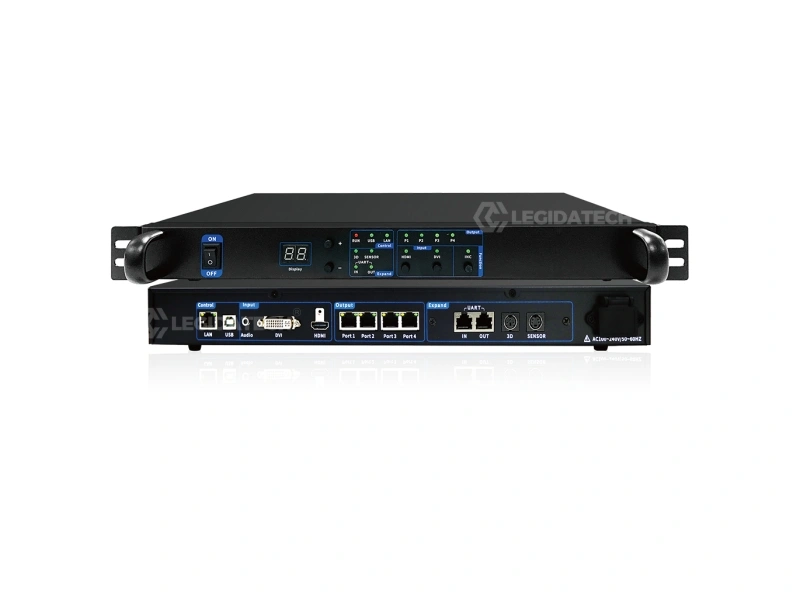
Controller rear panel — HDMI/DVI inputs and Gigabit Ethernet outputs to the cabinets
For the wiring and configuration sequence, see our LED display controller setup guide.
Hardware vs Software Controllers
A hardware controller is a dedicated box: it boots quickly, has fixed inputs and outputs, and is not affected by laptop updates. A software controller runs on a PC or media player and uses the computer’s GPU and network ports. Software is cheaper and flexible for small walls, but it adds a computer to the signal chain — and a computer is another failure point.
For a permanent outdoor billboard or a 24/7 control room, use a hardware controller with a backup playback option. For a temporary event or a small indoor wall, a software controller can be adequate if the computer is dedicated and the show file is tested.
Synchronous vs Asynchronous Control
Synchronous control means the wall displays the source in real time — required for live camera, IMAG, stage playback and anything that must stay in sync with audio. Asynchronous control means the controller stores and plays a playlist on its own, without a computer attached; it is the normal choice for advertising billboards and scheduled signage.
Many controllers support both modes. The decision is about the content workflow: if someone is operating the screen live, specify synchronous; if the screen runs a scheduled loop, asynchronous with remote publishing is simpler and more reliable.

Synchronous control — the wall follows the live source
Latency, Refresh Rate and Genlock
Latency is the delay between the source and the wall. A good hardware controller adds about one to two frames; software controllers and heavy processing can add more. For IMAG and live events, low latency matters more than extra features.
Refresh rate is how fast the wall redraws. 1,920 Hz is acceptable for budget signage; 3,840 Hz is the standard for camera-facing walls; 7,680 Hz is used in broadcast and high-end rental. If the wall will be filmed, specify the refresh rate and test it with the actual camera — a number on a datasheet is not a guarantee. The driver ICs behind the refresh specification are covered in our LED display driver IC guide.
Genlock locks the wall’s refresh to the camera or broadcast signal, eliminating rolling bands and tearing. It is essential in broadcast studios, XR stages and any production where the screen is in frame. Not every controller has Genlock; confirm it before the specification is fixed.
Common Controller Problems and Fixes
| Symptom | Likely cause | Fix |
|---|---|---|
| No image | Source resolution/EDID mismatch, bad cable, wrong input | Set the source to the wall canvas, re-seat the cable, check the input map |
| Black bars or cut-off edges | Source ratio does not match the wall canvas | Set the processor to the wall’s native resolution; use fit/original, not stretch |
| Flicker or banding on camera | Refresh rate too low or not locked | Raise to 3,840/7,680 Hz; enable Genlock if available |
| Tearing or rolling | Source and wall are not synchronized | Use synchronous mode or Genlock; avoid mixing refresh rates |
| Some cabinets dark | Port overload or a failed receiving card | Recalculate pixel load per port; swap the receiving card |
| Wrong colors | Color depth, gamma or input color space mismatch | Match 8/10-bit settings and color space across source, controller and wall |

Controller-to-cabinet wiring — signal and backup paths

Module-level control connection on a fine-pitch LED display
Frequently Asked Questions
What does an LED video wall controller do?
It accepts video sources, scales and arranges them into the wall’s native canvas, and distributes pixel data to the receiving cards in each cabinet. It also controls brightness, color, gamma and test patterns, and on higher-end models handles window layout, seamless switching and Genlock.
What is the difference between a controller, a processor and a sending card?
A video processor scales and switches multiple sources; a sending card distributes one processed signal to the wall; an all-in-one controller combines both. A “controller” quote can mean any of the three, so confirm the model and input/output list.
How many pixels can one LED controller drive?
It depends on the model and the number of Ethernet outputs. A Gigabit output typically carries about 650,000 pixels at 8-bit color; a 4-output controller drives about 2.6 million pixels, less at higher bit depth or refresh. Always leave 10–20% headroom.
How do I calculate the pixel load of my LED wall?
Divide the screen width and height by the pixel pitch, then multiply. A 6 × 3 m wall at P3 is 2000 × 1000 = 2,000,000 pixels. Add headroom for expansion and confirm the per-port capacity of the controller.
When is a video processor necessary?
Only when the system has multiple sources, needs PIP or seamless switching, or the source does not match the wall resolution. A single-source fixed wall can use a pure sending card; a live event or control room usually needs a processor or an all-in-one controller.
Should I choose a hardware or software controller?
Hardware for 24/7, outdoor, broadcast and live-event walls; software for small indoor walls where a dedicated computer is acceptable. Hardware costs more but removes the computer from the failure chain.
Why does my LED wall show black bars or cut-off content?
The source ratio or resolution does not match the wall canvas. Set the processor to the wall’s native resolution and use fit/original rather than stretch; if the wall is a custom shape, the content must be produced for that canvas.
How much does an LED video wall controller cost?
Entry controllers start at a few hundred dollars; mid-range all-in-one units run roughly US$1,000–5,000; high-end processors with Genlock, 10G fiber and redundancy can exceed US$10,000. The price depends on inputs, pixel capacity, brand and backup features — see our controller buying guide for the selection workflow.
Conclusion: Size the Controller to the Wall
The controller is not an accessory; it is the part that decides whether the wall can show the content you paid for. Calculate the pixel load, count the inputs you actually need, confirm the output ports and refresh rate, and leave headroom for expansion. For a buying workflow, use our LED video wall controller buying guide; for brand differences, see NovaStar vs Colorlight.
If you send us the wall size, pixel pitch, cabinet count and source list, we will confirm the pixel load, the controller class and the port count before quoting.
LEGIDATECH is an LED screen manufacturer supplying outdoor LED displays, rental LED walls and controller systems from our Shenzhen factory.