Colorlight’s X Series spans from the entry-level X1 (0.65M pixels) to the flagship X20 (11.5M pixels, 8K input) — covering every LED display from a small retail sign to a stadium-scale video wall. Each model targets a specific project scale, input requirement, and budget. Pick the wrong one and you either overpay for unused capacity or bottleneck your entire display.
At LEGIDATECH, we supply the full Colorlight X Series factory-direct — every unit undergoes 72-hour burn-in testing, includes full accessories, and ships with a 3-year warranty.
| Model | X1 | X2 | X2s | X4 | X4s | X4e | X8m | X16 ★ | X20 |
|---|---|---|---|---|---|---|---|---|---|
| Pixel Capacity | 0.65M | 1.3M | 1.3M | 2.3M | 2.6M | 2.6M | 5.24M | 8.88M | 11.5M |
| Ethernet Ports | 1x | 2x | 2x | 4x | 4x | 4x | 8x | 16x | 20x |
| Max Input Res | 1920×1200 | 1920×1200 | 1920×1200 | 1920×1200 | 1920×1200 | 1920×1200 | 3840×2160 | 4096×2160 | 7680×4320 |
| 4K/8K Input | — | — | — | — | — | — | 4K | 4K@60 | 8K |
| Video Inputs | DVI+HDMI+VGA | SDI+HDMI+DVI+VGA+CVBS | HDMI+DVI | SDI+HDMI+DVI+VGA+CVBS | HDMI+DVI | SDI+HDMI+DVI+VGA+CVBS | DP+HDMI2.0+DVI+VGA | HDMI2.0+DVIx4+SDIx2 | SDIx4+HDMI+DPx2 |
| Genlock | — | — | — | — | — | — | YES | IN+LOOP | YES |
| Multi-Layer | — | — | — | — | — | — | 6 Windows | 7 Layers | 8 Layers |
| HDCP | 1.4 | 1.4 | 1.4 | 1.4 | 1.4 | 1.4 | 1.4 | 2.2 | 2.2 |
| Front LCD | LED | 1.8in | — | 1.8in | — | 1.8in | LCD | 3.5in | 5in touch |
| Software | LEDVISION | LEDVISION | LEDVISION | LEDVISION | LEDVISION | LEDVISION | LEDVISION | iSet | iSet Pro |
| Power | 10W | 20W | 15W | 20W | 18W | 20W | 25W | 35W | 50W |
| Price (Factory) | $60-$120 | $125-$350 | $110-$150 | $125-$450 | $150-$300 | $180-$380 | $400-$700 | $800-$1,500 | $1,500-$3,000 |
| Best For | Small signs | Rental, commercial | Budget rental | Mid-scale all-purpose | Budget large installs | Standalone signage | 4K events | Broadcast, stadium | 8K command centers |
For a deeper understanding of the Colorlight ecosystem, read our guide on What Is Colorlight Control System. To understand how Colorlight compares with the alternative, see What Is NovaStar Control System.
References used in this guide: Official specifications from Colorlight Cloud Tech (colorlightinside.com) | Independent integrator analysis at DOIT VISION | Real-world feedback on r/VIDEOENGINEERING.
1. X1 — The Ultra-Budget Entry Point (0.65M Pixels)
The X1 is Colorlight’s most affordable controller — designed for small fixed LED displays, simple digital signage, and budget projects where pixel count is minimal. With 0.65M pixels across a single Gigabit Ethernet port, it handles small indoor signs up to approximately 3 sqm at P3 pitch.
- Pixel capacity: 0.65 million | Input: DVI + HDMI + VGA | Ports: 1x RJ45
- Power: 10W | Weight: ~1.0 kg | Cascade: Up to 8 units via USB
- Price: $60-$120 factory-direct
- Best for: Small stores, menu boards, basic indoor signage
2. X2 and X2s — The Industry Workhorse (1.3M Pixels)
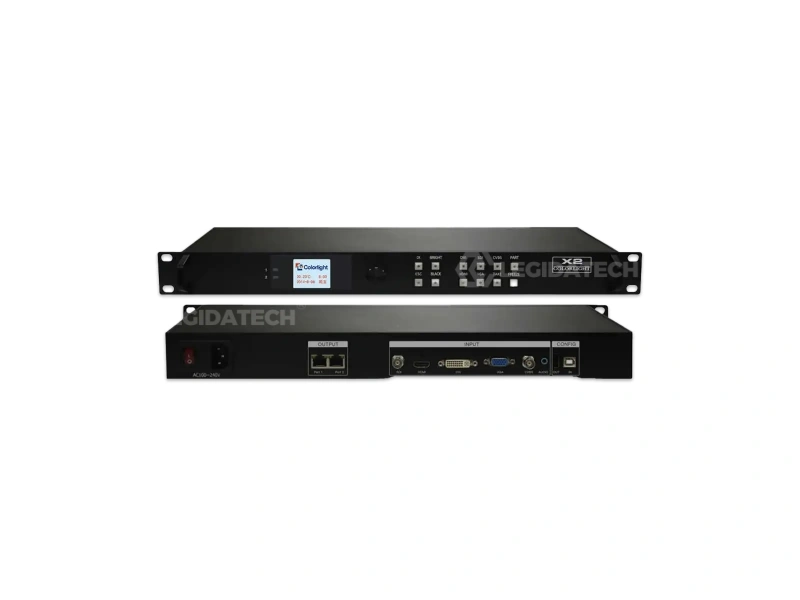
The Colorlight X2 is the most widely deployed controller in the Colorlight ecosystem. With 1.3M pixels across 2 Gigabit Ethernet ports and 5 video inputs (SDI, HDMI, DVI, VGA, CVBS), it covers approximately 70% of commercial LED projects globally. See Colorlight official documentation for full firmware and driver details. The dedicated 1.8-inch LCD front panel and function keys enable on-device configuration — no laptop needed on site.
- Pixel capacity: 1.3 million | Input: SDI + HDMI + DVI + VGA + CVBS | Ports: 2x RJ45
- Power: 20W | Weight: 2.0 kg | Cascade: Up to 8 units via USB
- Price: $125-$350 factory-direct
- Best for: Rental LED walls, conference rooms, commercial advertising
X2s — The Budget Variant. The X2s drops the SDI, VGA, and CVBS inputs, removes the LCD panel, and ships at $110-$150. It retains the same 1.3M pixel capacity and 2 Ethernet ports. Best for cost-sensitive rental fleets where HDMI/DVI is sufficient and on-device controls are not required.
3. X4 / X4s / X4e — The Mid-Range Trio (2.3M-2.6M Pixels)
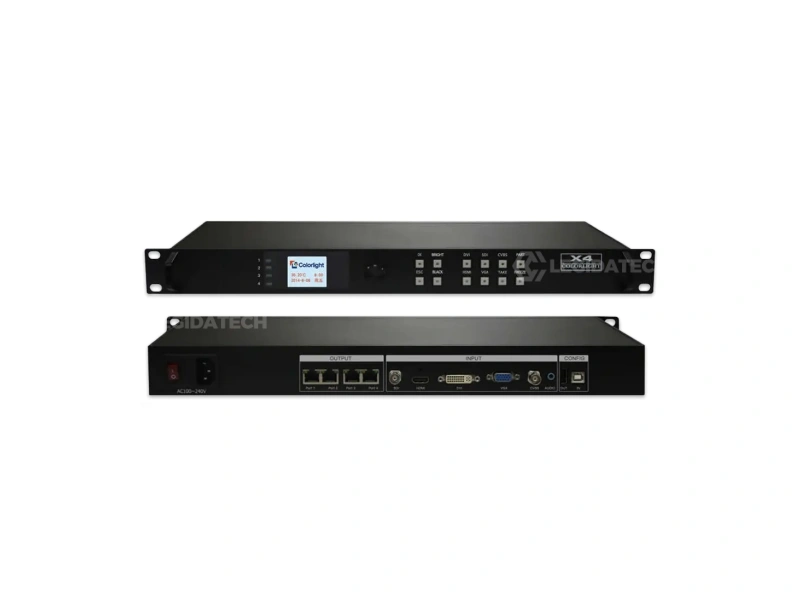
The Colorlight X4 occupies the sweet spot in the lineup — 2.3M pixels across 4 Gigabit Ethernet ports, 5 video inputs (SDI/HDMI/DVI/VGA/CVBS), integrated all-in-one architecture (video processor + sending card), and a 1.8-inch LCD. At 20W, it runs cool in enclosed racks. It is the go-to mid-range controller for rental staging, fixed indoor installations, and commercial advertising.
- Pixel capacity: 2.3 million | Input: SDI + HDMI + DVI + VGA + CVBS | Ports: 4x RJ45
- Power: 20W | Weight: 2.0 kg | Cascade: Up to 8 units via USB
- Price: $125-$450 factory-direct
- Best for: Mid-scale rental, fixed advertising, corporate conference rooms, XR virtual production
X4s — Best Pixel Capacity for the Price. The X4s bumps pixel capacity to 2.6M while dropping SDI/VGA/CVBS inputs and the LCD panel. At $150-$300, it delivers the best pixels-per-dollar ratio in the entire X Series — ideal for cost-sensitive large fixed installations where a PC is always available for configuration.
X4e — Standalone Playback Without a PC. The X4e adds USB flash drive playback to the X4 architecture — enabling standalone operation for digital signage locations without a dedicated media player or PC. It retains the full 5-input suite and LCD panel. Best for distributed digital signage networks where simplicity and reliability matter more than raw features.
4. X8m — The 4K Entry Point (5.24M Pixels)
The X8m is the gateway to 4K in the Colorlight ecosystem. With 5.24M pixels across 8 Gigabit Ethernet ports, DisplayPort + HDMI2.0 4K input, and a 6-window multi-picture engine, it handles large rental events, broadcast studios, and high-resolution fixed installations. Genlock support enables frame-accurate synchronization with cameras — essential when LED walls appear on screen.
- Pixel capacity: 5.24 million | Input: DP + HDMI2.0 + DVI + VGA | Ports: 8x RJ45
- Power: 25W | 6 Windows multi-picture | Genlock: YES
- 4K@60Hz input via DP/HDMI2.0
- Price: $400-$700 factory-direct
- Best for: 4K LED walls, large rental events, broadcast studios, fine-pitch indoor installations
5. X16 — The Broadcast-Grade Powerhouse (8.88M Pixels) ★ Recommended
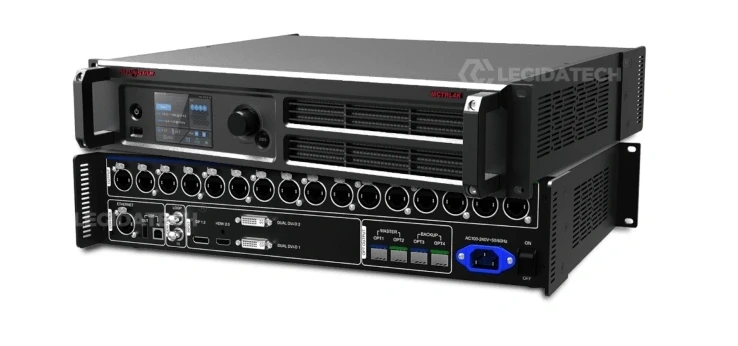
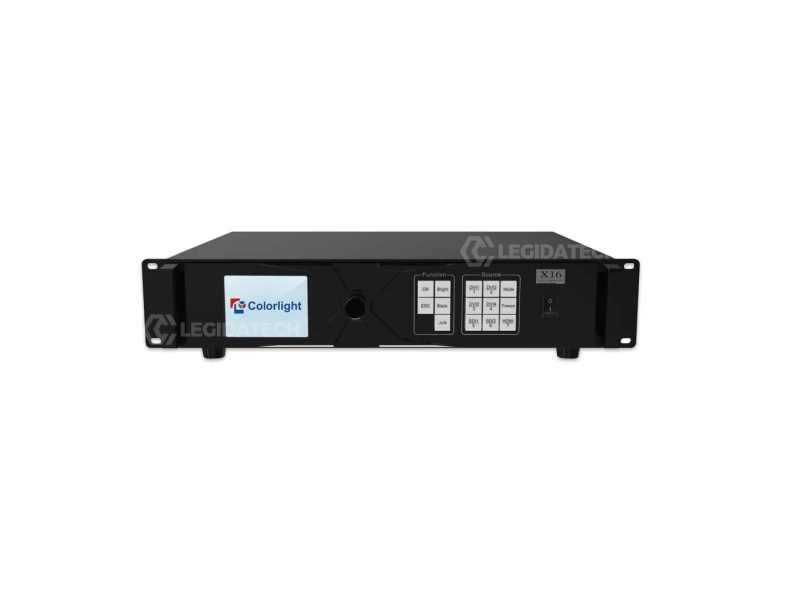
The Colorlight X16 is the pinnacle of Colorlight’s professional controller lineup. With 8.88M pixels across 16 Gigabit Ethernet ports, HDMI2.0 4K@60Hz with HDCP 2.2, dual 3G-SDI broadcast inputs, a 7-layer multi-picture engine, and dedicated Genlock IN + LOOP ports, the X16 delivers capabilities typically found only in broadcast-grade video processors costing 3-5x more.
- Pixel capacity: 8.88 million | Input: HDMI2.0 (4K@60) + DVIx4 + SDIx2 | Ports: 16x RJ45
- 7 Layers multi-picture with free positioning/scaling | Genlock IN+LOOP
- HDCP 2.2 | 3.5-inch LCD | iSet software (professional configuration)
- Power: 35W | Price: $800-$1,500 factory-direct
- Best for: Stadium LED screens, broadcast OB vans, XR virtual production, large-format fine-pitch installations, multi-camera live events
Genlock: The Professional Differentiator. Genlock synchronizes the video output to an external reference signal — eliminating screen tearing when LED walls appear on camera. For broadcast studios, virtual production LED volumes, and any event captured on camera, Genlock is not optional — it is essential. The X16’s dedicated Genlock IN and LOOP ports enable daisy-chain sync distribution across multiple controllers.
6. X20 — The 8K Flagship (11.5M Pixels)
The X20 is Colorlight’s flagship — purpose-built for the most demanding deployments. 11.5M pixels across 20 Gigabit Ethernet ports, 8K@30Hz input via dual DisplayPort, 4x 12G-SDI inputs, 8 independent video layers, HDCP 2.2, and a 5-inch touchscreen front panel. It drives true 8K LED walls (7680×4320) in a single unit — the only Colorlight controller capable of this.
- Pixel capacity: 11.5 million | Input: DPx2 (8K) + HDMI + SDIx4 | Ports: 20x RJ45
- 8 Layers multi-picture | Genlock: YES | HDCP 2.2
- 5-inch Touchscreen | iSet Pro software | Power: 50W
- Price: $1,500-$3,000 factory-direct
- Best for: 8K command centers, mega-stadium displays, broadcast control rooms, 8K digital art galleries
S20 — The Professional Sending Box
The S20 sits outside the standard X Series classification. It is a rack-mount industrial sending box with 20 Gigabit Ethernet ports — designed for large-scale fixed LED installations where centralized rack management is preferred over multiple smaller controllers. It does not include video inputs; instead, it pairs with an external video processor or media server, distributing the signal across 20 output ports. Best for permanent installations exceeding 15 million pixels.
How to Choose: Decision Framework
Step 1: Calculate Your Pixel Count
Multiply your total cabinets by pixels per cabinet. A P3.91 500x500mm cabinet = 128×128 = 16,384 pixels per cabinet. A 6mx3m wall = 72 cabinets x 16,384 = 1,179,648 pixels. Compare this number against each controller’s pixel capacity. For receiving card calculation guidance, see our receiving card calculation guide.
Step 2: Match to a Controller
| If Your Pixel Count Is… | Your Options | Recommendation |
|---|---|---|
| Under 0.65M | X1 or higher | X1 (save money, simplest setup) |
| 0.65M – 1.3M | X2, X2s | X2 if you need SDI/LCD; X2s for budget HDMI/DVI only |
| 1.3M – 2.3M | X4, X4s, X4e | X4 (best balance); X4s for cost-sensitive; X4e for standalone |
| 2.3M – 5.2M | X8m or cascade 2x X4 | X8m (single unit, 4K input, simpler) |
| 5.2M – 8.9M | X16 or cascade 2x X8m | X16 (Genlock, 7 layers, broadcast-grade) |
| 8.9M – 11.5M | X20 or cascade 2x X16 | X20 (single unit 8K, 20 ports) |
| Over 11.5M | Cascade 2+ X20 | X20 x N (uniform, Genlock-ready) |
Step 3: Add Feature Requirements
- Need 3G-SDI input? X2, X4, X4e, X16, X20 (models with SDI in specifications)
- Need 4K input? X8m (DP/HDMI2.0), X16 (HDMI2.0), X20 (Dual DP 8K)
- Need Genlock for broadcast? X8m, X16 (IN+LOOP), X20
- Need multi-layer display? X8m (6 windows), X16 (7 layers), X20 (8 layers)
- Need standalone USB playback? X4e (the only model with this feature)
- Need the lowest cost per pixel? X4s (2.6M pixels at $150-$300)
- Need professional iSet software? X16, X20 (iSet / iSet Pro)
- Need HDCP 2.2 for 4K content? X16, X20
- Need the most Ethernet ports? X20 (20 ports)
Common Mistakes When Choosing an X Series Controller
Mistake 1: Buying an X16 for a 2M-Pixel Wall
Deploying an X16 ($800-$1,500) for a 2M-pixel corporate lobby display wastes approximately $600-$1,000. The extra 16 ports, Genlock, 7-layer engine, and iSet complexity provide zero benefit. An X4 handles 2.3M pixels perfectly at $125-$450. Match the controller to the actual pixel count — not the product sheet.
Mistake 2: Cascading Too Many Small Controllers
Cascading 4 X4 units to drive a 4K wall costs $500-$1,800 and adds Genlock complexity across 4 devices. A single X8m ($400-$700) handles the same pixel count with native 4K input and built-in Genlock — cheaper and simpler.
Mistake 3: Ignoring Input Requirements
Buying an X2s (HDMI + DVI only) for a live event that needs SDI camera input requires a format converter — adding $80-$200 and a failure point. The standard X2 includes SDI for approximately $15-$200 more. Always match the controller’s input suite to your actual signal sources.
Mistake 4: Mixing Controller Architectures
Colorlight advises against mixing different controller architectures (X Series with Z Series or older S Series) in the same synchronized system. Different processing latencies cause synchronization issues. Use identical X Series controllers throughout any cascaded deployment.
Software Ecosystem: LEDVISION vs iSet
One of Colorlight’s key advantages is software consistency across the X Series:
| Software | Controllers | Key Capabilities |
|---|---|---|
| LEDVISION | X1, X2, X2s, X4, X4s, X4e, X8m | Screen configuration, receiving card mapping, brightness/color calibration, input switching, basic scheduling. Free download. |
| iSet | X16 | All LEDVISION features + multi-layer management, Genlock timing, input cropping/scaling, advanced layer positioning. Broadcast-focused. |
| iSet Pro | X20 | All iSet features + 8K canvas management, 8-layer support, 4x 12G-SDI configuration, touchscreen-optimized interface. |
Learn LEDVISION once — configure any controller in the X1 through X8m range. The transition to iSet is intuitive for experienced LEDVISION users.
Learn the complete iSet workflow from screen mapping to Genlock configuration — applicable to Colorlight X16 and X20 controllers.
See how Colorlight controllers power professional LED displays at ISLE 2025 — the LED industry’s largest trade show.
X Series vs Competitors: Where Colorlight Wins
For a head-to-head brand comparison, see our upcoming NovaStar vs Colorlight comparison guide. In summary:
- Cost advantage: Colorlight hardware typically costs 15-20% less than equivalent NovaStar controllers at each tier
- Input flexibility: Entry-level X2 already includes 5 video inputs including SDI — NovaStar MCTRL300 only has DVI
- Software simplicity: LEDVISION is widely considered more intuitive than NovaStar’s NovaLCT for basic configuration
- Ecosystem compatibility: All X Series controllers work with the same receiving cards — simplifying spare parts management
- NovaStar advantage: Larger .rcfg library for niche modules, broader third-party support, more established in high-end broadcast
Price-to-Performance Ranking
If we rank X Series controllers by pixels per dollar:
| Rank | Model | Pixels/$ | Why |
|---|---|---|---|
| 1 | X4s | ~11,600 px/$ | Best value in the entire series — 2.6M pixels at $150-$300 |
| 2 | X8m | ~9,500 px/$ | 5.24M pixels + 4K input at $400-$700 |
| 3 | X4 | ~8,000 px/$ | Full feature set at competitive price |
| 4 | X16 | ~7,700 px/$ | Broadcast features add cost; value lies in capability |
| 5 | X2 | ~5,500 px/$ | You pay for the 5-input suite and LCD panel |
| 6 | X20 | ~5,100 px/$ | 8K, 8 layers, touchscreen demand premium |
| 7 | X1 | ~7,200 px/$ | Low capacity but lowest absolute cost |
Important note: Pixels-per-dollar is not the right metric for professional applications. The X16 ranks 4th in px/$ — but for a broadcast OB van where Genlock, SDI, and 16-port density are mandatory, it is the only controller at any price in the Colorlight ecosystem. Choose the controller that meets your technical requirements first, then optimize for price within that category.
Frequently Asked Questions
Which X Series controller is best for a rental company?
For rental fleets: X2 for most jobs (best value, 5 inputs, LCD panel). Add X4 for larger screens (4 ports, 2.3M pixels). Add X8m for 4K events. Add X16 for broadcast jobs that require Genlock and multi-layer. The X2s is the best option for budget rental kits where SDI is never needed.
Which Colorlight controller is equivalent to the NovaStar MCTRL660?
The Colorlight X4 is the closest equivalent — 2.3M pixels, 4 Ethernet ports, multiple video inputs. The X4 adds SDI input (missing from standard MCTRL660) and typically costs 15-20% less. See our NovaStar MCTRL Series comparison for details.
Can I use Colorlight receiving cards with a NovaStar controller?
No. Colorlight controllers only work with Colorlight receiving cards. NovaStar controllers only work with NovaStar receiving cards. The control protocols are proprietary. Choosing a brand commits your entire LED display control system to that ecosystem.
Does the X2 support 4K input?
No. The X2’s maximum input resolution is 1920×1200@60Hz. For 4K, step up to the X8m, X16, or X20. However, the X2’s 1.3M pixel capacity is sufficient for Full HD LED walls in most commercial applications.
What receiving cards are compatible with the X Series?
All Colorlight receiving cards: 5A-75B/E (most popular), E80/E120/E320, i5+/i8/i9+, K5+/K8/K9+/K10, plus multifunction cards (iM9, M9) and optical fiber transceivers (H2F, H10Fix, H16F, H10FN).
What is the difference between LEDVISION and iSet?
LEDVISION (X1 through X8m) handles standard screen configuration, receiving card mapping, brightness/color calibration. iSet (X16) adds professional multi-layer management, Genlock timing, input cropping/scaling. iSet Pro (X20) adds 8K canvas support. All are free downloads.
The Bottom Line
The Colorlight X Series covers every LED display from 0.5M to 88M+ pixels. The key is matching the controller to your actual requirements — not your aspirations.
For 70% of commercial LED projects, the X2 hits the sweet spot: 1.3M pixels, 5 inputs including SDI, LCD panel, and multi-unit cascading — all at $125-$350. For larger projects, the X4 and X8m scale cleanly. For broadcast and stadium-scale deployments, the X16 and X20 deliver capabilities normally found only in dedicated video processors costing 3-5x more.
Colorlight hardware averages 15-20% lower cost than equivalent NovaStar controllers, and LEDVISION software is widely appreciated for its intuitive interface. For buyers prioritizing measurable ROI, the X Series presents a data-driven optimal choice.
For the NovaStar alternative, see our complete NovaStar MCTRL Series comparison and VX vs MCTRL guide. Also explore our LED Display Types 2026 Ultimate Guide and NovaStar Controller Buyers Guide.
Get Factory-Direct Pricing on the Complete X Series
At LEGIDATECH, we stock every Colorlight X Series controller with factory-direct pricing, 72-hour burn-in testing, full accessory kits, and 3-year warranty:
- Colorlight X2 — $125-$350 | 1.3M pixels, 5 inputs, LCD panel — the industry workhorse
- Colorlight X4 — $125-$450 | 2.3M pixels, 4 ports, all-in-one architecture
- Colorlight X16 — $800-$1,500 | 8.88M pixels, 16 ports, broadcast Genlock, 7 layers
- X1, X2s, X4s, X4e, X8m, X20 — Full lineup available on request
legidatechled@gmail.com | WhatsApp: +86 185 69492693
Published by LEGIDATECH — Your factory-direct source for Colorlight controllers, NovaStar controllers, LED display cabinets, and complete LED screen solutions. 15+ years of LED manufacturing experience.