Choosing the right LED wall display model comes down to five decisions: indoor or outdoor use, screen area, viewing distance, brightness and refresh requirements, and budget. Match the pixel pitch to your closest viewing distance, verify the manufacturer behind the quote, and the model almost chooses itself. The tables below give you the numbers to decide before you ask for a price.
How to Choose the Right LED Wall Display Model in 5 Steps
Work through these five steps in order. Each one removes options until only a small group of models is left.
Step 1. Decide indoor or outdoor first
Indoor LED screens are built for controlled light: they run at 600–1,500 nits and are not waterproof. Outdoor LED displays must survive sunlight, rain and temperature swings, so they use higher brightness (5,000 nits and up), tougher cabinets and weather sealing. If a screen stands outside, even under a canopy, treat it as outdoor. This single decision halves the model list immediately.
Step 2. Fix the screen area and shape
Decide the width and height in meters — or the cabinet layout, for example 500×500 mm or 500×1,000 mm rental panels. The area and aspect ratio determine the total pixel count together with the pixel pitch you choose in Step 3. Stage backdrops, lobbies and control rooms each end up with a different sweet spot.
Step 3. Measure the viewing distance and derive the pixel pitch
Walk to the position of the closest viewer and note the distance in meters. As a working rule, a viewer needs about one meter of distance for every millimeter of pixel pitch: P3 for roughly 3 m, P4 for 4 m, P10 for 10 m. A pitch that is too large for the audience looks pixelated up close; a pitch that is unnecessarily fine adds cost without a visible gain.

Step 4. Match brightness, refresh rate and the environment
Indoor walls normally need 600–1,500 nits; outdoor advertising screens need 5,000–6,500 nits to stay readable in daylight. For camera-facing work — stage, church live-streams, broadcast — choose a refresh rate of 1,920 Hz or higher with synchronous control. Outdoor locations demand IP65 or better on the front, plus a plan for humidity, heat and lightning. The spec table later in this guide covers each number.
Step 5. Set a budget band and check the manufacturer
Pixel pitch and screen area dominate the price. Fix a budget band first (entry, mid-range or fine pitch), then check the supplier: real factory photos and video, sample testing, 72-hour aging records, warranty terms and spare-parts policy. The cheapest quote is rarely the cheapest screen over five years of operation.
Which Type of LED Display Is Best: Indoor or Outdoor?
There is no universally best type — the best LED display is the one matched to its environment. Compare the two families with this table:
| Factor | Indoor LED display | Outdoor LED display |
|---|---|---|
| Brightness | 600–1,500 nits | 5,000–6,500 nits for sunny exposure |
| Weather protection | Not waterproof; IP30–IP40 typical | Front IP65+ typical, weatherproof cabinets |
| Typical pixel pitch | P1.2–P4 | P4–P10 (P2.9–P4 for close outdoor viewing) |
| Refresh and grayscale | High refresh common, camera-friendly at 1,920 Hz+ | 1,920 Hz for stage and rental; lower acceptable for advertising |
| Maintenance | Front or rear access depending on the installation | Front service often required on billboards |
| Typical use | Conference rooms, retail, lobbies, studios, stage rental | Billboards, stadiums, storefronts, transport hubs |

Once the type is fixed, browse the matching product families: our indoor LED screens for controlled environments, or the outdoor LED display range for weather-exposed walls.
What Is the Best Resolution for an LED Screen?
The best resolution is the smallest pixel pitch your closest viewer actually needs — not the finest pitch you can afford. The P number is the distance between two adjacent pixels in millimeters: P2 means 2 mm. The smaller the pitch, the more pixels per square meter, the higher the resolution and the higher the price.
| Model | Pixels per m² | Clear viewing from about | Typical use |
|---|---|---|---|
| P1.2–P1.9 | 277,000–694,000 | 1–2 m | Control rooms, video conferencing, fine-pitch retail |
| P2 | 250,000 | 2 m | Conference rooms, high-definition showrooms |
| P2.5 | 160,000 | 2.5–3 m | Lobbies, lecture halls, HD stage walls |
| P3 | 111,111 | 3 m | Stage rental, events, shops |
| P4 | 62,500 | 4 m | Banquet halls, medium venues |
| P5 | 40,000 | 5 m | Exhibition halls, large stage screens |
| P6 | 27,777 | 6 m | Outdoor storefronts, distant stages |
| P8 | 15,625 | 8 m | Outdoor advertising |
| P10 | 10,000 | 10 m | Large billboards, stadiums |

Convert your area into an actual resolution with the standard formula: total pixels = (width in m ÷ pitch in m) × (height in m ÷ pitch in m). A 4 × 2 m wall at P3 gives roughly 1,333 × 667 pixels, which comfortably plays full-HD content at typical viewing distances. For the full placement math, see our LED screen viewing distance and pixel pitch guide.

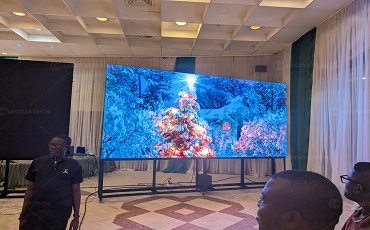
Venues used to default to P5 or coarser stage screens and viewers saw grain the moment they walked closer. Today indoor stage walls commonly run P2.5 and P3, and P2 when true high definition is required. The wall below is a real P2.9 indoor event installation — a practical middle ground that stays sharp from about 3 m yet stays affordable over large areas:
If your wall must be watched from under 2 m, compare small-pitch LED screens; below about P1.5, COB LED modules usually beat SMD packaging for smoothness, contrast and durability.
What Are the Disadvantages of LED Displays (and How to Plan Around Them)?
LED walls are not free of trade-offs. Knowing the weaknesses before you sign the order is what separates a smooth installation from an expensive surprise:
| Disadvantage | Why it happens | How to plan around it |
|---|---|---|
| Higher initial cost than projection or LCD walls | Per-pixel cost; fine pitch multiplies the LED count | Buy the pitch your viewing distance needs — no finer |
| Individual dead or stuck pixels | Modules age; shipping and handling damage | Insist on 72-hour aging before shipment plus spare modules |
| Scan lines or moiré on camera | Refresh too low or pitch interacting with camera sensors | Choose 1,920 Hz or higher for broadcast, church and stage |
| Power draw and heat | High brightness consumes power; outdoor sun adds load | Use efficient drivers, allow airflow, plan enclosure ventilation |
| Too bright indoors at night, or glare in daylight | Brightness set for the worst-case environment | Auto-brightness sensors and scheduled brightness profiles |
| Fixed native resolution | Content must match the wall’s pixel layout | Confirm content sources and scaling before purchase |
What Brightness, Refresh Rate and IP Rating Do LED Walls Need?
Three numbers appear in every quotation. Here is what they mean for your project:
| Specification | Indoor rule of thumb | Outdoor rule of thumb |
|---|---|---|
| Brightness (nits) | 600–1,500 | 5,000–6,500 for sunny exposure |
| Refresh rate | 1,920 Hz+ when cameras film the wall; 3,840 Hz+ for slow-motion broadcast | 1,920 Hz for stage and rental; 1,080–1,920 Hz acceptable for static advertising |
| IP rating | IP30–IP40 | Front IP65+; IP54 rear in ventilated enclosures |
| Grayscale / color depth | 16–22 bit processing in the driver silicon for smooth gradients in both families | |
Do not let a supplier substitute a low-refresh panel into a camera-facing project, and do not pay for a broadcast refresh rate on a menu board that will never appear on camera.
Which LED Wall Display Model Fits Each Venue?
Once the type and pitch range are fixed, application guidance narrows the choice further:
Banquet and multi-function halls
Wedding and event backgrounds run either as rentable stage walls or fixed installations. For a rental screen, P3.91 or P4.81 in 500×500 mm or 500×1,000 mm cabinets assembles quickly without tools and travels in flight cases; the panels below are exactly that configuration. For a permanently fixed stage wall, P3 or P4 is the common choice.

Installed areas vary with the hall: a small banquet room may only take about 10 m² of screen, while a super-large hall can exceed 80 m².

Video conferencing and control rooms
Monitoring and security rooms have historically used LCD splices, but small-pitch LED now takes over where 4K clarity is required. The stable workhorses are P1.25, P1.53, P1.6 and P1.8, built from 320×160 mm die-cast aluminum modules that install and service quickly.
Lecture halls and auditoriums
Stage-background walls in school auditoriums usually fall between 30 and 100+ m². The recommended models are P2, P2.5, P3 and P4 depending on the depth of the hall.
Exhibition and planning halls
Exhibition walls show company content to visitors standing close, so the range is P1.25, P1.53, P1.86, P2 and P2.5 over a typical installed area of 20–50 m²:

Reception and lobby areas
Front-desk walls are watched from about 3–10 m and stay small — typically 8–15 m² — so P2.5 and P3 cover the vast majority of reception installations.
What Budget Tier Fits Your LED Wall Project?
Price scales mainly with area, pixel pitch, the brand of LED chips and driver ICs, cabinet material, refresh rate and warranty. Bands help you ask the right questions:
| Band | Typical projects | Where to save without regret |
|---|---|---|
| Entry / commercial | Retail menu boards, lobbies, P3–P6 | Standard SMD modules, standard driver ICs, simple async control |
| Mid-range / professional | Conference rooms, stage rental, P2–P4 | Keep refresh rate and warranty; negotiate cabinets and spares |
| Fine pitch / premium | Control rooms, broadcast, P0.9–P2 | Weigh COB versus SMD, calibration services, redundant power supplies |
| Outdoor advertising | Billboards, P6–P10 | Front service access and 24/7 stability over raw brightness |
Expect quotes for the same specification to differ between manufacturers by more than the panels alone: LED chip brand, driver IC, power supply, warranty and after-sales support hide the gap. Read how the cost splits in our LED screen price guide before comparing numbers.
How to Verify an LED Display Manufacturer Before You Buy
The model list is worthless if the supplier behind it cannot build, test and support the wall. Minimum checks:
- See the factory, not just the website — ask for real production-floor photos, video walk-throughs and, ideally, a live video call; treat stock-render galleries as a warning sign.
- Ask for aging and burn-in records — a serious factory runs 72-hour tests and can show the log for your batch.
- Request a sample or pre-shipment QC report — check brightness uniformity, dead pixels and cabinet finish on the actual units, not the brochure.
- Read the warranty in writing — coverage period for modules, power supplies and controllers, and who pays freight on replacements.
- Confirm spare parts and remote support — spare modules and controllers in stock, plus remote configuration help after installation.
Working with an experienced LED screen manufacturer who ships complete, tested systems daily shortens both the risk and the learning curve. For indoor walls specifically, compare our indoor LED wall manufacturer credentials and ask for customer references that match your industry.
LED Wall Display Model FAQ
Which type of LED display is best?
Indoor and outdoor models are built differently: indoor LED displays run 600–1,500 nits and are not waterproof, while outdoor LED displays need 5,000–6,500 nits and IP65+ protection. Choose indoor only when the wall sits in a controlled environment; everything else counts as outdoor.
What is the best resolution for an LED screen?
The best resolution is the smallest pixel pitch your nearest viewer needs: about 1–2 m viewing for P1.2–P1.9, 2–3 m for P2–P2.5, 3 m for P3, and 10 m for P10. A finer pitch than the viewing distance requires only raises the price.
How do I calculate which LED model I need?
Use total pixels = (width in m ÷ pitch in m) × (height in m ÷ pitch in m), and place the closest viewer at about one meter per millimeter of pitch. A 4 × 2 m wall at P3 equals roughly 1,333 × 667 pixels.
What are the disadvantages of LED displays?
The main ones are higher initial cost than projection or LCD, individual pixel failures over time, moiré on camera when the refresh rate is low, power and heat, and a fixed native resolution. Each has a known mitigation, from 72-hour aging tests to 1,920 Hz refresh and auto-brightness.
Is a bigger pixel pitch always cheaper?
Usually yes per square meter, but total cost also depends on area and supporting systems. A coarse pitch on a large wall can cost more than a fine pitch on a small one, so always compare complete quotations for the same area and content plan.
Why do LED display quotations for the same model differ so much?
Differences hide in LED chip brand, driver ICs, power supplies, cabinet material, refresh rate, warranty and after-sales support. Verify the full bill of materials and the factory behind it before comparing price tags.