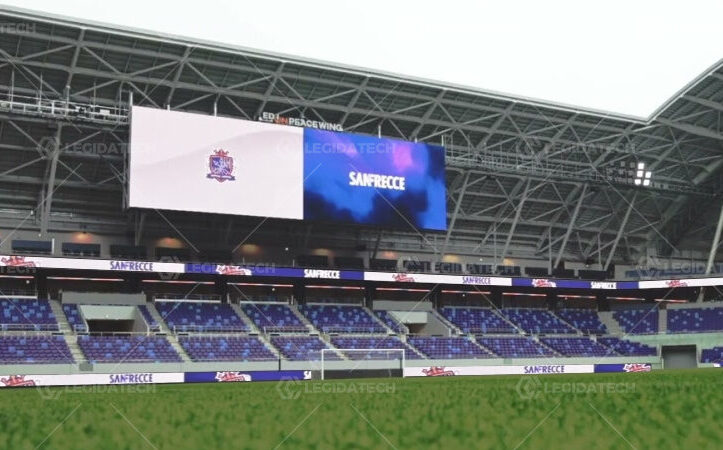
When evaluating large-volume B2B procurement, investment decisions should be based on measurable engineering performance instead of promotional messaging. P3 vs P4 outdoor LED display ROI requires a comprehensive assessment of their actual return on investment using objective technical data.
In outdoor retail settings, the choice of pixel pitch significantly influences upfront installation costs, ongoing maintenance expenses, and the display’s ability to capture the attention of pedestrians. This report presents an independent technical review of the core performance indicators and lifecycle cost factors that determine the long-term economic value of these two widely used LED display options.
Pixel Pitch Fundamentals: How P3 vs P4 Outdoor LED Display ROI Depends on Viewing Distance and Content Resolution
The recommended viewing distance for an LED display can be calculated with a simple formula: pixel pitch (mm) × 1000 ÷ 0.3. This calculation helps users choose the right screen for different installation environments. A P3 display delivers clear and detailed images when viewed from about 10 meters away.
For this reason, it is a good option for storefront displays and other locations where people stand close to the screen. A P4 display performs better at a viewing distance of around 13.3 meters or more.
At that range, the image remains smooth because individual pixels are less noticeable. Outdoor LED billboards installed above street level or along wide roads usually meet this viewing distance. In these situations, a P4 display offers a more cost-effective choice, while the added expense of a P3 display often provides only limited practical benefits.
Minimum Viewing Distance and Application Suitability
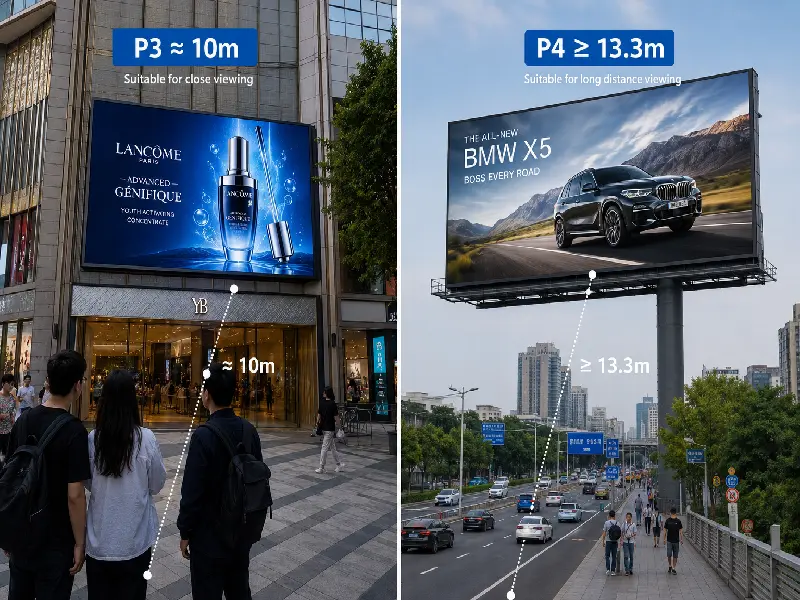
Viewing distance recommendations can be estimated using the standard calculation: pixel pitch (mm) × 1000 ÷ 0.3. According to this guideline, a P3 LED display delivers clear and detailed visuals from around 10 meters, making it well suited to storefronts and other commercial locations where viewers are typically close to the screen.
In comparison, a P4 display performs best when the audience is approximately 13.3 meters away or farther, as the greater viewing distance minimizes the visibility of individual pixels. For elevated outdoor signs or advertising boards installed beside wide roadways, these conditions are easily satisfied, allowing P4 to provide a more economical solution without noticeably reducing display effectiveness.
Content Resolution and Data Bandwidth
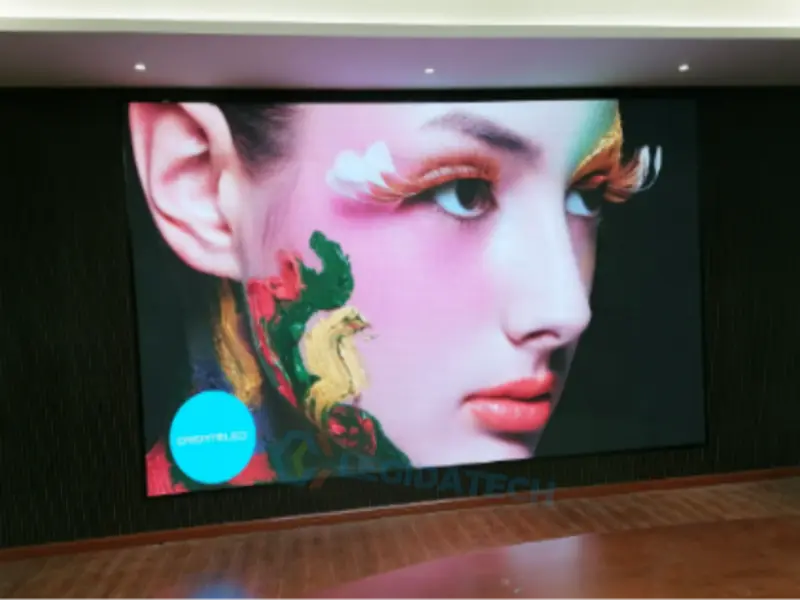
The pixel density of a P3 screen is higher, so it can show sharp content like 1080p or 4K video in a compact space. This makes it a great fit for retail displays that need to present product details or play high-res footage. But there is a trade-off: that same density puts extra pressure on the data processing side, both on the sending card and the receiver cards. For example, a typical Novastar HUB75 port supports fewer P3 modules than P4 ones. As a result, system builders often have to choose more advanced controllers with greater bandwidth, which usually cost more.
A P4 panel, by contrast, does not need as much data to run. This lower requirement makes it easier for the screen to hit a high refresh rate, for instance, 3840Hz. That kind of speed is especially helpful when you are recording the display with a camera. It also helps cut down on flicker and those annoying scan lines you sometimes see.
So, in short, P3 panels give you sharper pictures, while P4 panels tend to deliver smoother motion in some scenarios. Both have their good points, and the right choice really comes down to what matters most for your project.
Cost Implications of Pixel Density
Pixel pitch and cost go hand in hand in a pretty straightforward way. Take a P3 panel, for instance. It needs about 111,111 LEDs for every square meter. A P4 panel, on the other hand, only requires 62,500 LEDs for the same area. That extra 44% in parts adds up quickly and pushes the material costs higher.
Now, think about a street retail setup where people usually stand around 15 meters away from the screen. At that distance, your eyes really cannot tell the difference between a P3 and a P4 display.
But here is the catch: the P3 version often comes with a price tag that is 30% to 50% more expensive upfront. In cases like this, the cost comparison leans heavily toward the P4 option. Why? Because the money you save on the screen itself can go toward making better ads or even buying a bigger display.
Cost Analysis: Initial Price vs Total Cost of Ownership in P3 vs P4 Outdoor LED Display ROI
So when you look at the upfront price, that is the biggest factor in the P3 versus P4 decision. A P3 panel uses many more LEDs per square meter, so its bill of materials is much higher. Recent checks at Shenzhen factories show that the price gap usually falls between 30% and 50% per square meter.
For a 50-square-meter sign along a street, that gap could mean an extra $20,000 to $30,000 right off the bat. That extra cost is all wrapped up in the hardware—things like the SMD LEDs, the circuit board layout, and the metal cabinets that hold everything together.
Total Cost of Ownership (TCO) Over Five Years
While the initial price is a critical variable, the true financial metric is the TCO. Using the provided engineering formulas, a comparative model for a standard 10-hour operational day at $0.12/kWh is constructed.
| Parameter | P3 Panel (5,000 nits) | P4 Panel (5,500 nits) |
| Initial Cost (per m²) | $1,200 | $800 |
| Power Consumption (per m²) | ~278 W | ~242 W |
| Annual Power Cost (per m²) | $121.76 | $105.99 |
| 5-Year Power Cost (per m²) | $608.80 | $529.95 |
| 5-Year Maintenance (per m²) | $200 | $150 |
| 5-Year TCO (per m²) | $2,008.80 | $1,479.95 |
The numbers tell an interesting story. Even though the P4 screen has fewer pixels per square meter, it actually uses less power over time. That is mainly because it has a better fill factor—35% versus 30% for the P3—and it also turns electricity into light more efficiently, at 65 lumens per watt compared to 60.
So when you look at the total cost of ownership over five years, the P4 comes out way ahead. It costs about $1,480 per square meter, while the P3 runs around $2,009. That difference of $529 per square meter is nothing to ignore, especially for projects that run for several years.
When Lower Resolution Yields Higher Net Profit
Now, here is where it gets interesting. In a street retail setting, the viewers are usually about 15 meters away from the screen. At that distance, the human eye simply cannot make out individual pixels on a P4 display—its visual limit is around 13.3 meters anyway. So all those extra pixels on a P3 screen are basically wasted on the average passerby. That is why, in this type of setup, the ROI comparison clearly tilts toward the P4.
The money you save on the purchase price can go toward other things that actually make a difference, like a bigger screen, better video content, or stronger mounting hardware. In the end, you get the best return not by going for the highest specs, but by picking the pixel pitch that fits the real-world viewing distance.
Brightness and Environmental Durability: Ensuring Consistent P3 vs P4 Outdoor LED Display ROI in Harsh Conditions
Luminance and Environmental Stress Testing
For a street retail sign, you need a display that stays bright and holds up well under different weather conditions. A typical P3 panel puts out around 5,000 nits of brightness. A P4 panel, in comparison, often reaches about 5,500 nits. That difference does not happen by chance. It comes from the P4’s larger pixel size and its higher fill factor—35% versus 30% for the P3. That design lets the P4 send out more light from each unit of screen area.
Now think about a sunny day. When the sun is overhead, ambient light can reach 100,000 lux. Under those conditions, a P3 screen with 5,000 nits gives you a contrast ratio of about 5 to 1. That is right at the bare minimum for reading ads clearly. The P4, with its extra 500 nits, pushes that ratio up to 5.5 to 1. So in really bright, glare-heavy spots, the P4 has a slight edge.
IP Ratings and Salt Spray Resistance
Durability matters too, and that is where standard tests come in. Both P3 and P4 outdoor cabinets should meet at least IP65 as a baseline. That rating means they are fully dustproof and can handle low-pressure water jets. But if you are setting up a sign near the coast, you really need IP66, which guards against stronger, high-pressure water sprays.
There is another factor that people often miss: salt spray resistance. This is measured using the ASTM B117 standard. In a typical 240-hour test, the cabinet and circuit board are exposed to a salty mist that simulates ocean air. Factory checks show that P4 cabinets tend to do better here.
They usually have thicker die-cast aluminum walls—about 2.0 millimeters compared to 1.5 millimeters on P3 models. After the salt test, the P4 shows about 15% less material loss from corrosion. That means it lasts longer in seaside locations, and that longer life helps improve the overall return on investment by cutting down on early cabinet replacements.
Thermal Management and Junction Temperature
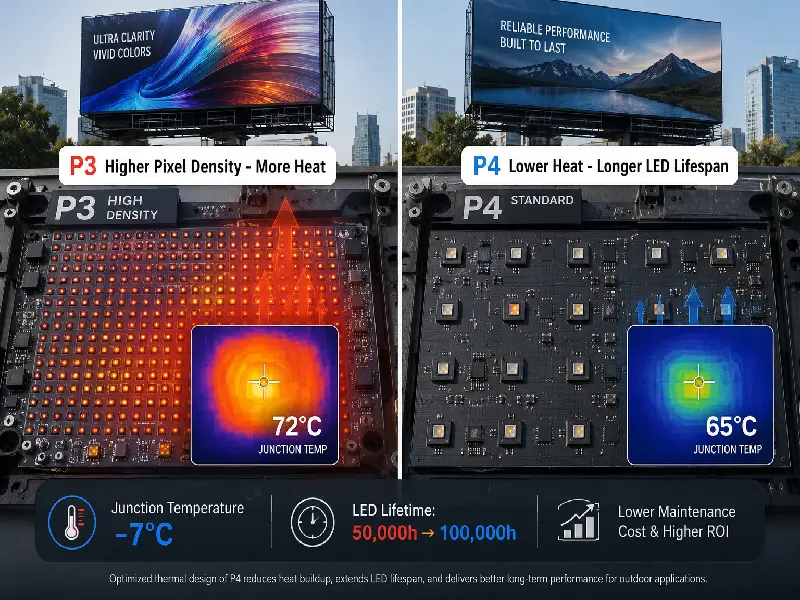
The temperature inside the LED chip plays a big role in how long the screen will last. A P3 module packs more LEDs into the same space, so it gives off more heat per square meter.
When you run it continuously at 5,000 nits, the chip temperature can climb up to about 72°C. A P4 module, on the other hand, has fewer LEDs and a better fill factor. That design keeps things cooler, with the temperature usually staying around 65°C.
Now, that 7‑degree difference might not sound like much, but it actually has a huge effect on longevity. According to the Arrhenius equation, dropping the junction temperature by just 7°C can double the life of the LEDs. So instead of lasting 50,000 hours, they could reach 100,000 hours.
For anyone doing an ROI calculation on an outdoor P3 or P4 sign, this matters a lot. Over five years, the P4 screen will need fewer module swaps. That means you spend less on replacement parts and labor, which directly lowers the maintenance side of your total cost of ownership.
Technical Trade-offs: Refresh Rate, Grayscale, and Bandwidth Constraints in P3 vs P4 Outdoor LED Display ROI
Refresh Rate and Grayscale Performance
Refresh rate and grayscale depth are two key factors that affect how a video looks on a display. This matters a lot for street retail signs that show fast-moving ads. A P3 panel packs in 111,111 pixels per square meter.
That high density puts a heavy load on the receiving card and the Novastar HUB75 port. Because of all that data, the refresh rate usually tops out at 1920Hz.
A P4 panel, by contrast, only has 62,500 pixels in the same area. That means it sends much less data through each port. So the same controller can drive the screen at a much higher refresh rate—3840Hz. This faster rate gets rid of flicker when you record the screen with a camera. It also makes fast-moving content look smooth and natural.
Grayscale performance follows a similar pattern. A P3 screen uses a 14‑bit processing engine, but it has to handle over 111,000 pixels per scan line.
That heavy workload can cut into the grayscale quality, especially when the brightness is turned up high. The P4 screen, with fewer pixels to manage, keeps full 14‑bit grayscale even at its peak brightness of 5,500 nits.
So when you run an ROI comparison for an outdoor P3 or P4 sign, the P4 often comes out ahead in video quality. It handles ad content better—especially slow‑motion clips or high‑contrast scenes—without needing expensive, high‑bandwidth controllers to do the job.
Bandwidth Constraints and System Architecture
The Novastar HUB75 standard sets a limit on how many pixels each port can handle. At a 3840Hz refresh rate, that limit is roughly 65,536 pixels per port. Now, both a P3 module and a P4 module come in a 64‑by‑64 pixel size, so each one uses 4,096 pixels per port. But here is the key difference: the P4 module covers a larger physical area with that same pixel count.
This makes a big difference in how you build the system. With a P4 screen, you can drive a full square meter of display using fewer ports on a receiving card like the Novastar A5s Pro.
That means you need less cabling and fewer controller cards. All of that adds up to a 10% to 15% saving on the control system alone. For anyone calculating ROI on an outdoor P3 or P4 sign, those lower hardware costs help you recover your initial investment faster.
Impact on Video Playback and Content Flexibility
For street retail, being able to show different types of content is really important. P4 screens handle this well because they have a higher refresh rate and need less bandwidth.
They can play 60‑frame‑per‑second video smoothly, with no dropped frames or screen tearing. P3 screens are a different story. When you push them to 3840Hz, you often have to use tricks like pixel multiplexing or reduce the grayscale quality, which hurts the overall image.
So if you are comparing a P3 and a P4 billboard for ROI, the P4 usually wins out in retail settings where high‑quality video matters most. The P3 does give you sharper text and still images, but it can introduce motion blur or artifacts that take away from the viewing experience.
Conclusion
In summary, there is no single right answer when it comes to choosing between a P3 and a P4 outdoor display. The best choice really depends on where you put the screen and who will be looking at it.
Take a flagship store on a busy pedestrian street, for example. People often stand within 10 meters of the window display. In that case, the P3 screen’s higher pixel density—111,111 pixels per square meter—makes a real difference.
It handles small text and detailed product images with ease. At that close range, the content looks sharp and draws people in, which can boost both foot traffic and sales. Sure, the upfront cost is higher at about $1,200 per square meter, but the visual payoff often makes it worth it.
Now think about a roadside sign placed above a storefront. Here, viewers are usually more than 13 meters away. At that distance, the human eye simply cannot tell the difference between the two resolutions. So the P4 panel, with its 62,500 pixels per square meter, does the job just fine.
Plus, it costs less to run. Over five years, the total cost of ownership for a P4 comes to about $3,070 per square meter, compared to $3,830 for a P3. It also uses less power—242 watts per square meter versus 278. For projects that are cost‑sensitive and have medium viewing distances, the P4 usually pays for itself faster.
So how do you decide? Do a simple check. Measure the shortest distance from the screen to where people or vehicles pass by. If that distance is under 10 meters, go with P3. If it is over 13 meters, pick P4. For that tricky middle zone between 10 and 13 meters, you could try a mixed approach. Use P3 panels on the lower part of the screen and P4 ones on the upper section. That way, you balance quality and cost.
Also, think about what you plan to show. Ads with lots of static text and fine details lean toward P3. But if your content is mostly video, the P4’s smoother refresh rate gives it an edge.
In the end, the right call comes from looking at your specific site. Use the formulas and guidelines we have covered here. Check the viewing distance, pixel density, and five‑year costs. With that data in hand, procurement teams can make a smart, well‑informed investment that truly maximizes returns for their street retail setup.
Related Posts About P3 & P4
P3 Outdoor LED Screen Cost: Is the Premium Worth It?
P4 Outdoor LED Screen Size Calculator for Shopping Mall Installations
How to choose a P4 LED display
P3.91 Outdoor LED Screen Factory Price: Complete Cost Guide 2026
P3.9 Outdoor LED Display Installation: UK Case Study
Outdoor P3.9 LED Display: What You Need to Know
About Stage Rental P3.9 LED Display
Quick FAQ — LED Display Contrast Ratio
1. Which LED screen is better, P3 or P4?
The choice between P3 and P4 depends on viewing distance and budget. P3 has a pixel pitch of 3mm, offering higher resolution and sharper images for close-up viewing (optimal at 3m+). P4 (4mm pitch) is more cost-effective for larger displays viewed from 4m+. For a balance of quality and cost, consider P3 vs P4 outdoor LED display ROI: P3 yields better visual impact for high-traffic areas, while P4 offers lower upfront cost with acceptable clarity for standard advertising. Practical tip: always calculate total cost of ownership including power consumption and maintenance.
2. What is the price of P4 outdoor LED screen?
P4 outdoor LED screen prices typically range from $400 to $800 per square meter, depending on brightness (≥5500 nits), IP rating (IP65+), and brand. For a 10m² display, expect $4,000–$8,000. However, when evaluating P3 vs P4 outdoor LED display ROI, note that P4’s lower pixel density may require larger screens for same resolution, potentially offsetting savings. Practical tip: request quotes with full installation and warranty to avoid hidden costs.
3. Is P3 higher than P4?
In LED display terminology, ‘higher’ typically refers to resolution or pixel density. P3 (3mm pitch) has higher pixel density than P4 (4mm pitch), meaning more pixels per area and sharper images. However, P3 is not ‘higher’ in physical size or brightness. For outdoor use, P3 is preferred for closer viewing distances (3–5m), while P4 suits longer distances (5m+). When analyzing P3 vs P4 outdoor LED display ROI, P3 may offer better long-term value for premium advertising, while P4 is more budget-friendly for large-format messaging.
At LEGIDATECH, LED screen manufacturer form China have been manufacturing LED displays for over 13 years. We supply screens to customers across more than 108 countries — churches, shopping malls, control rooms, concert stages, outdoor billboards, and everything in between. If you are planning an LED display project and want a straightforward recommendation based on your specific conditions, we are happy to help.