“P1.8 LED display” sounds like one product, but it is really a family name. Ask three suppliers for a P1.8 screen and you may be quoted P1.83, P1.875 or P1.86 — three different pitches that all round to “1.8 mm.” The visual difference is tiny, but the module size, cabinet compatibility, price and lead time are not. This guide explains what P1.8 actually means, how the three variants differ, and how to specify the right one before you sign a purchase order.
What Is a P1.8 LED Display?
A P1.8 LED display is an indoor small-pitch LED screen with a pixel pitch of roughly 1.8 mm. Pixel pitch is the center-to-center distance between two adjacent LEDs; at 1.8 mm, one square meter holds about 284,000–296,000 pixels, depending on the exact variant. That density is enough for a viewer standing 2–4 m away to see a smooth image rather than individual pixels.
P1.8 screens are used where the audience is close and the content is detailed: conference rooms, boardrooms, control centers, monitoring rooms, hotel meeting spaces, exhibition halls and broadcast studios. They are indoor products. An outdoor P1.8 cabinet would need much higher brightness and a sealed, weather-rated structure, and most projects at that pitch are indoor installations.
The important point is that “1.8” is a rounded category. The exact pitch can be 1.83 mm, 1.86 mm or 1.875 mm, and each has its own module geometry. That geometry — not the pitch alone — decides whether the screen fits your room, your cabinet system and your spare-parts plan.
Why P1.8 Is a Family: P1.83, P1.875 and P1.86
LED manufacturers design modules around different lamp packages, PCBs, driver ICs and cabinet systems. A product that is “about 1.8 mm” can therefore land on different exact pitches. The three common versions are:
- P1.83 — 1.839 mm pitch, usually a 320 × 160 mm module with 174 × 87 pixels and about 295,664 pixels/m².
- P1.86 — 1.86 mm pitch, usually a 320 × 160 mm module with 172 × 86 pixels and about 288,906 pixels/m².
- P1.875 — 1.875 mm pitch, usually a 240 × 240 mm module with 128 × 128 pixels and about 284,444 pixels/m².
All three are legitimately called “P1.8” in everyday communication. The differences in pitch are 0.015–0.036 mm, and the pixel-density difference between the extremes is under 4%. At normal viewing distance, most viewers cannot tell them apart. The differences that matter are commercial and mechanical: which module size your cabinet system accepts, which variant is in volume production, and what the spare-part supply looks like three years from now.
P1.83 vs P1.875 vs P1.86: Specification Comparison
| Specification | P1.83 | P1.86 | P1.875 |
|---|---|---|---|
| Pixel pitch | 1.839 mm | 1.86 mm | 1.875 mm |
| Common module size | 320 × 160 mm | 320 × 160 mm | 240 × 240 mm |
| Module resolution | 174 × 87 px | 172 × 86 px | 128 × 128 px |
| Pixel density | 295,664 px/m² | 288,906 px/m² | 284,444 px/m² |
| Common cabinet sizes | 640 × 480 mm; 960 × 480 mm | 640 × 480 mm; 640 × 640 mm | 480 × 480 mm; 960 × 960 mm |
| Production scale | Lower; often tender-driven | Highest of the three | High and growing |
| Relative panel cost | Premium | Lowest | Close to P1.86 |
| Best fit | Fixed tender specification | Most conference and control-room projects | Projects built around 240 mm modules |
The table is a starting point, not a quotation. Module sizes can vary by manufacturer, and some suppliers offer custom cabinets. Always ask for the module size, module resolution and cabinet resolution in writing — those three numbers identify the exact product better than the “P1.8” label.
The Differences That Actually Matter
1. Pixel density is not the deciding factor. P1.83 has the highest density, but the gap to P1.875 is only about 4%. At 2–3 m viewing distance, that difference is invisible in video and barely detectable in fine text. Do not pay a large premium for P1.83 on the assumption that it looks significantly sharper; it does not.
2. Module size drives cabinet compatibility. P1.86 and P1.83 use a 320 × 160 mm module, which fits the 640 × 480 mm cabinet format common in P2 and P2.5 indoor screens. That means a room originally planned around a 320 × 160 mm module can often move to P1.86 without redesigning the cabinet grid. P1.875 uses a 240 × 240 mm module, so it needs a 480 × 480 mm or 960 × 960 mm cabinet and a different screen layout. If you are replacing an existing wall or matching a fixed architectural opening, this is the first thing to check.
3. Production scale decides price and lead time. P1.86 is the volume model, so its panel price is usually the lowest and spare modules are easy to find. P1.875 is also widely produced and priced close to P1.86. P1.83 is less common, costs more, and often has a longer production cycle; it frequently appears in tender documents where an exact model is specified for procurement control. If a tender does not name P1.83, there is rarely a technical reason to choose it over P1.86.
4. Service and spares favour the volume model. A screen is a ten-year asset. The variant with the largest installed base is the one most likely to have modules, receiving cards and technicians available when something fails. For most buyers, that is P1.86. If you choose P1.83 for a tender, budget for spare modules at the time of order, because future availability is less certain.
Which P1.8 Variant Should You Choose?
Use this decision order:
- Existing cabinet or fixed opening? Match the module size first. A 320 × 160 mm system points to P1.86 or P1.83; a 240 × 240 mm system points to P1.875.
- New project with no legacy constraint? Start with P1.86. It is the volume model, the most cost-effective, and the easiest to service.
- Tender or written specification naming P1.83? Quote P1.83 as specified, but confirm the module resolution and lead time. Do not substitute silently.
- Need a 240 × 240 mm module for a specific design? P1.875 is the right family; confirm the cabinet grid and spare modules.
For a deeper specification walkthrough of the volume model, see our P1.86 LED display ultimate guide.
If the buyer simply says “P1.8” with no module size, the safest response is to ask two questions: what module size does the cabinet use, and what module resolution is expected? Those answers prevent the most common P1.8 ordering mistake — delivering a technically correct “P1.8” screen that does not fit the existing cabinet or structural opening.
Confirm the Right P1.8 Variant
P1.8 LED Module and Cabinet Sizes
Cabinet geometry is where the three variants diverge most. The table below shows the common module-to-cabinet relationships; confirm the exact cabinet list with your supplier before ordering.
| Variant | Module size | Common cabinet | Module grid | Cabinet resolution |
|---|---|---|---|---|
| P1.86 | 320 × 160 mm | 640 × 480 mm | 2 × 3 | 344 × 258 px |
| P1.86 | 320 × 160 mm | 640 × 640 mm | 2 × 4 | 344 × 344 px |
| P1.83 | 320 × 160 mm | 640 × 480 mm | 2 × 3 | 348 × 261 px |
| P1.875 | 240 × 240 mm | 480 × 480 mm | 2 × 2 | 256 × 256 px |
| P1.875 | 240 × 240 mm | 960 × 960 mm | 4 × 4 | 512 × 512 px |

P1.875 LED module — 240 × 240 mm, 128 × 128 pixels
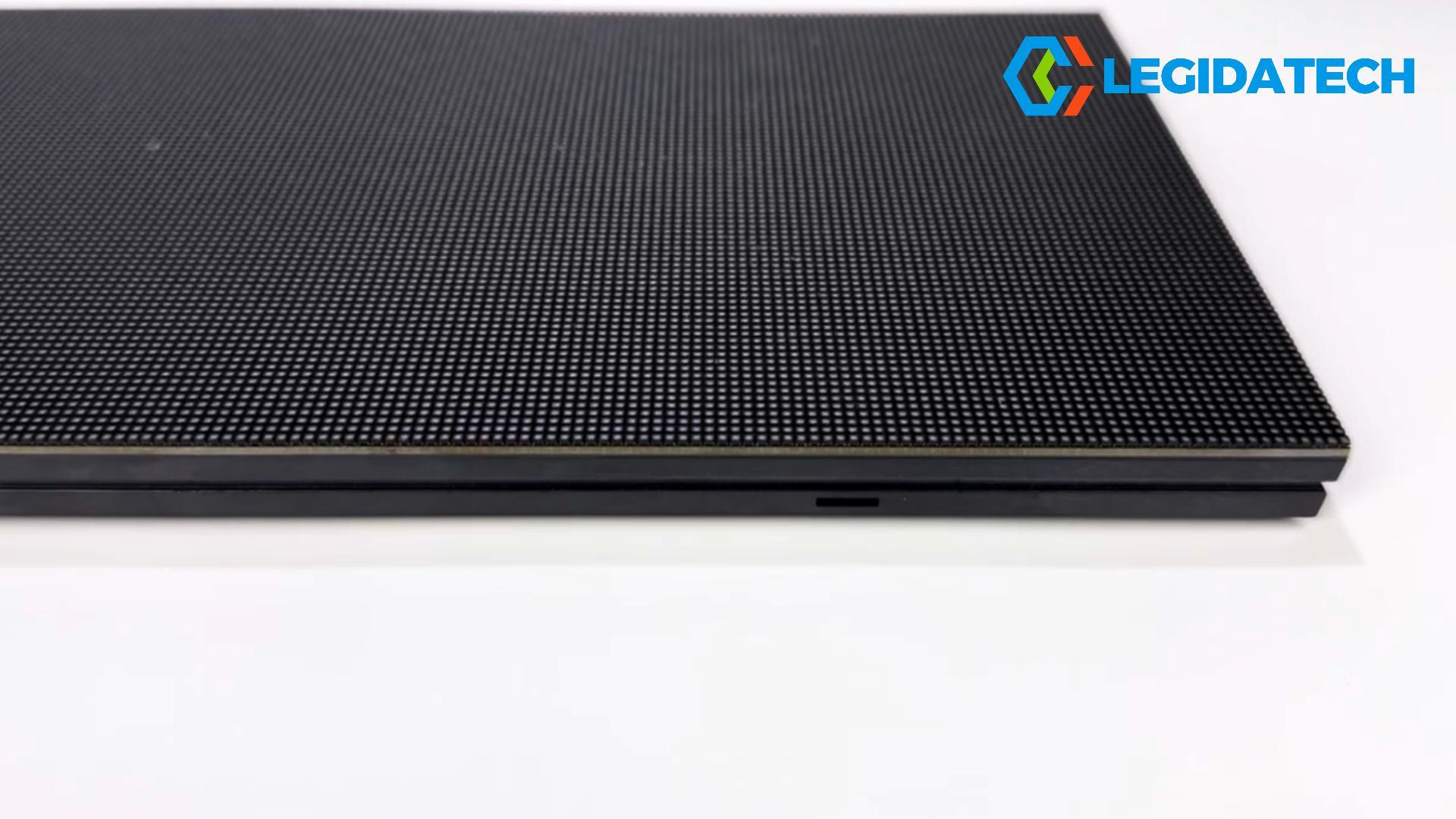
P1.86 LED module — 320 × 160 mm, 172 × 86 pixels
For the module-level detail, see our P1.8 LED module guide, the P1.875 indoor module page and the full LED modules range.
P1.8 LED Display Viewing Distance and Resolution
The rule of thumb for minimum viewing distance is the pitch in millimeters: about 1.8 m for P1.8. The comfortable distance is usually two to three times the pitch, or 3.6–5.4 m, where the pixel grid disappears and the image reads as continuous. In a conference room, the nearest seat is often 2–3 m from the screen, which is why P1.8 is a common choice for rooms that cannot accommodate a P2.5 wall.
Native resolution matters as much as distance. A 1920 × 1080 canvas measures about 3.53 × 1.99 m at P1.83, 3.57 × 2.01 m at P1.86 and 3.60 × 2.03 m at P1.875. A 4K canvas doubles those dimensions. If your content is 1080p and the wall is 4.8 m wide, the screen will be upscaled; if it is 6 m wide, a 4K source is a better match. Plan the screen size and content resolution together, using our LED screen resolution calculator.
| Pitch | Pixel density | Minimum viewing distance | Comfortable distance | Typical room |
|---|---|---|---|---|
| P1.5 | 444,444 px/m² | About 1.5 m | 3–4.5 m | Premium boardroom, close-view studio |
| P1.8 class | 284,444–295,664 px/m² | About 1.8 m | 3.6–5.4 m | Conference room, control room |
| P2 | 250,000 px/m² | About 2 m | 4–6 m | Meeting room, hotel ballroom |
| P2.5 | 160,000 px/m² | About 2.5 m | 5–7.5 m | Large hall, lobby, lecture theatre |
P1.8 vs P1.5 vs P2 vs P2.5: Where It Fits
P1.8 sits between the premium P1.5 and the value-oriented P2. If the nearest viewer is 2–3 m and the content includes spreadsheets, CAD drawings or small text, P1.5 is visibly cleaner but costs more. If the nearest viewer is 4 m or more, P2 can deliver the same perceived clarity for less money. P1.8 is the middle ground for rooms where the front row is close but the budget cannot justify P1.5 throughout.
The choice is usually driven by the room, not the pitch chart. Measure the nearest seat, the screen width and the content type. If the screen is 4–5 m wide and the front row is 2.5 m away, P1.8 is a sensible fit. If the room is 8 m deep and the front row is 5 m back, P2 is likely enough. Our pixel pitch and viewing distance guide walks through the calculation.
Where P1.8 LED Displays Are Used
P1.8 screens are indoor products, and the applications share one trait: a relatively close audience that needs detailed content. Typical installations include:
- Conference rooms and boardrooms — presentations, video calls, spreadsheets and live camera feeds. See our hotel and meeting-space LED screens.
- Control centers and monitoring rooms — SCADA, CCTV and data dashboards viewed from 2–4 m.
- Exhibition halls and showrooms — product detail and brand content at close range.
- Broadcast studios — camera-safe refresh rates and uniform color across the wall.
A fine-pitch P1.8 LED wall in a corporate conference room
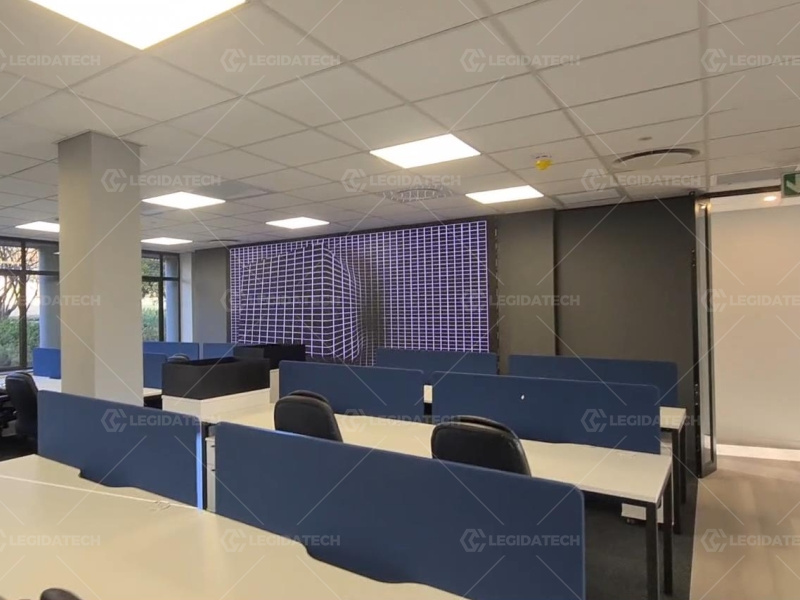
A 5.76 × 2.4 m P1.876 indoor LED display installed in South Africa
P1.8 LED Display Buying Checklist
Before you compare quotes, confirm these eight points in writing:
- Exact pitch and module resolution — 1.83, 1.86 or 1.875 mm; 174 × 87, 172 × 86 or 128 × 128.
- Module and cabinet size — does it match the existing cabinet or the structural opening?
- Pixel density and native resolution — calculate the wall’s actual pixel count, not just the pitch.
- Viewing distance — measure the nearest seat, not the back of the room.
- Refresh rate and driver IC — 3,840 Hz minimum; 7,680 Hz if the wall will be filmed.
- Brightness — match the room lighting; 500–800 nits is typical for indoor conference use.
- Control system and spares — NovaStar or Colorlight, with spare receiving cards and modules.
- Aging test and warranty — ask for the aging report, dead-pixel rate and spare-parts list.
Frequently Asked Questions
What is a P1.8 LED display?
A P1.8 LED display is an indoor small-pitch LED screen with a pixel pitch of about 1.8 mm. It is available in three common variants — P1.83, P1.86 and P1.875 — and is used in conference rooms, control centers and other close-view indoor spaces.
Is P1.8 the same as P1.86?
Not exactly. P1.86 is one variant of the P1.8 family. The family also includes P1.83 and P1.875. All three round to “1.8 mm,” but they use different module sizes and pixel densities, so they are not interchangeable without checking the cabinet.
What is the difference between P1.83, P1.875 and P1.86?
P1.83 has a 1.839 mm pitch, a 320 × 160 mm module and about 295,664 pixels/m². P1.86 has a 1.86 mm pitch, a 320 × 160 mm module and about 288,906 pixels/m². P1.875 has a 1.875 mm pitch, a 240 × 240 mm module and about 284,444 pixels/m². The visual difference is small; the module and cabinet compatibility is the bigger issue.
Which P1.8 variant is best for a conference room?
For most new conference rooms, P1.86 is the practical default: it is the highest-volume variant, costs less than P1.83 and is easy to service. Choose P1.875 if the room is designed around a 240 × 240 mm module, or P1.83 only if a tender specifies it.
What is the viewing distance for a P1.8 LED display?
The minimum comfortable distance is about 1.8 m, and the comfortable range is roughly 3.6–5.4 m. In a conference room, place the nearest seat at least 2 m from the screen; for detailed content, 3 m or more is better.
What resolution is a P1.8 LED wall?
It depends on the wall size and exact pitch. A 1920 × 1080 canvas is about 3.53 × 1.99 m at P1.83, 3.57 × 2.01 m at P1.86 and 3.60 × 2.03 m at P1.875. A 4K canvas doubles those dimensions.
Is P1.8 suitable for outdoor use?
No. P1.8 is an indoor fine-pitch product. Outdoor use requires a weather-sealed cabinet, much higher brightness and a different cooling design. For outdoor screens, choose an outdoor-rated pitch such as P4.8, P6 or P8.
How much does a P1.8 LED display cost?
Price depends on the exact variant, module size, brightness, control system and order volume. P1.83 usually carries a premium over P1.86 and P1.875. For a budget reference by pitch and area, see our indoor LED screen price guide, then request a quotation for your wall size.
Conclusion: Specify the Exact P1.8, Not the Label
P1.8 is a useful shorthand, but it is not a specification. The exact pitch, module size and module resolution decide whether the screen fits your cabinet, your room and your spare-parts plan. For most new projects, P1.86 is the practical default; P1.875 is the alternative when the design is built around a 240 mm module; P1.83 is usually a tender-driven choice rather than a performance upgrade.
If you send us the room dimensions, the nearest viewing distance and the content type, we will confirm the right P1.8 variant, the cabinet layout and a factory-direct price.
Request a P1.8 LED Display Layout
LEGIDATECH is an LED screen manufacturer supplying fine-pitch indoor LED displays, rental LED walls and outdoor LED screens from our Shenzhen factory.
Related:
P1.86 LED Display Ultimate Guide
P1.8 LED Module — Detailed Guidance
P1.875 Indoor LED Display Module
Indoor LED Wall Manufacturer
Indoor LED Screen Price Guide