


Novastar MCTRL660 PRO LED Display Controller
The Novastar MCTRL660 PRO is a broadcast-grade independent LED controller engineered for live production environments — combining native 3G-SDI input, dual 10G SFP+ fiber outputs, GENLOCK frame synchronization, and sub-1ms processing latency in a single 1U chassis. Each unit undergoes 48-hour burn-in testing before shipment. Supplied factory-direct with 3-year warranty and pre-shipment quality certification from LED screen manufacturer LEGIDATECH.
🔗 2×10G Fiber Output
⚡ <1ms Low Latency
🎬 GENLOCK Sync
🎛️ 6× Gigabit Ethernet
💰 Factory-Direct Price
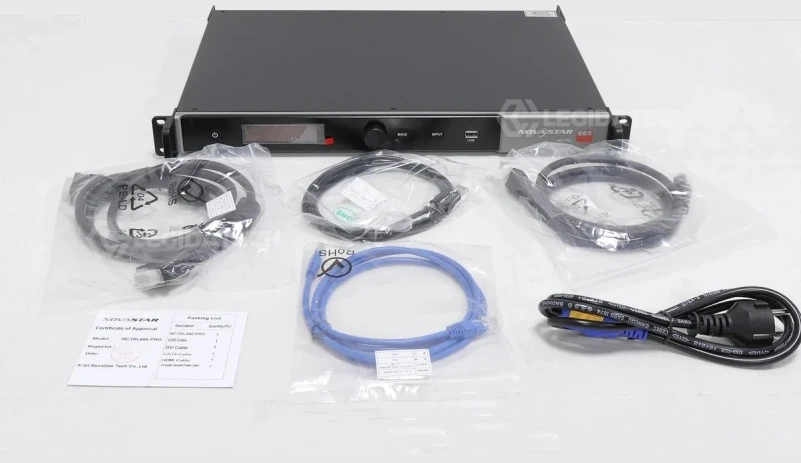
What Is the Novastar MCTRL660 PRO?
The Novastar MCTRL660 PRO LED display controller is the broadcast-grade member of NovaStar’s MCTRL independent controller family — the only model below the MCTRL4K that combines native 3G-SDI input, dual 10G optical fiber outputs, GENLOCK frame synchronization, and sub-1ms processing latency in a single 1U chassis. Unlike the standard MCTRL660, which is optimized for rental staging with HDMI/DVI workflows, the MCTRL660 PRO is engineered for live broadcast OB vans, XR virtual production volumes, large-scale rental deployments requiring fiber-based long-distance transmission, and any application where camera-to-wall frame synchronization is non-negotiable. For architecture comparison, see synchronous vs asynchronous LED control.
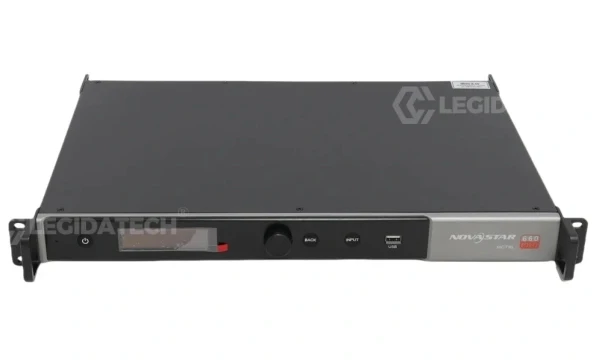
Why the MCTRL660 PRO Exists
The standard MCTRL660 (released 2017) serves rental staging and fixed installations where the primary video source is HDMI or DVI from a laptop or media server. But as LED walls moved into broadcast studios, OB vans, and XR volumes, three requirements emerged that the standard model could not meet: SDI input for direct camera/switcher connection, GENLOCK for camera-to-wall frame synchronization, and fiber output for cable runs exceeding 100 meters. The MCTRL660 PRO addresses all three — it is not an incremental upgrade but a fundamentally different controller for a fundamentally different operational environment.
Independent Controller Architecture
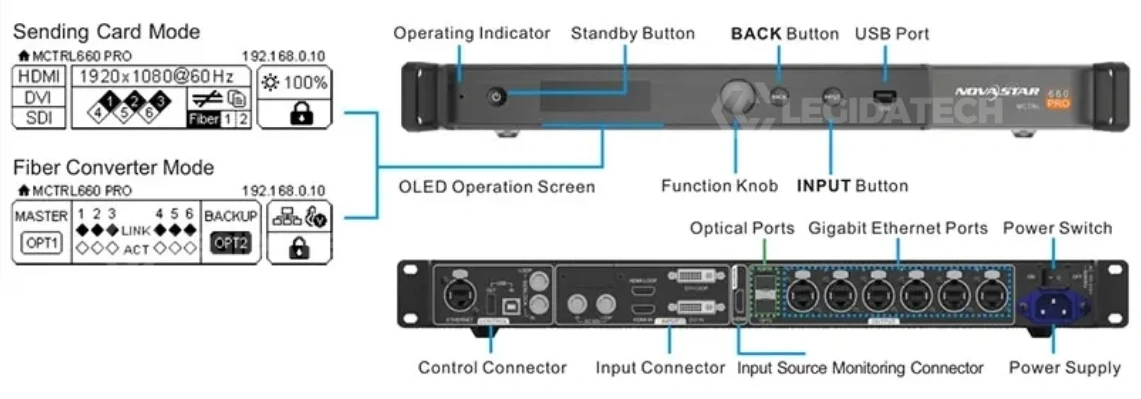
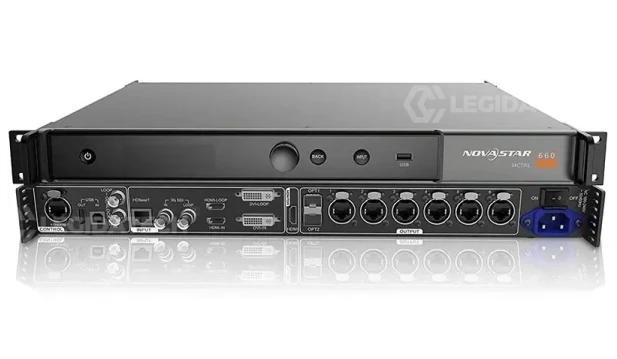
Unlike PCIe sending cards that require opening a computer case, the MCTRL660 PRO is a standalone 1U device. It accepts 3G-SDI, HDMI 1.4a, and SL-DVI inputs; processes and distributes signal across 6 Gigabit Ethernet ports and 2 SFP+ fiber ports directly to receiving cards. The independent form factor means faster deployment, easier troubleshooting, and no dependency on the playback computer’s hardware configuration.
Broadcast-Grade SDI Integration
The 3G-SDI input (SMPTE ST 424/292/259 compliant) enables direct connection to broadcast cameras, production switchers, and OB van equipment over standard BNC coaxial cable — up to 100 meters without repeaters. Includes 3G-SDI loop-through for daisy-chaining to additional controllers or monitors without external distribution amplifiers. HDMI and DVI cannot match SDI’s cable length, mechanical reliability (BNC bayonet vs friction-fit), or embedded audio/timecode/metadata support.
Fiber Transmission + GENLOCK
Dual 10G SFP+ optical ports support single-mode fiber transmission up to 10 km — immune to electromagnetic interference and ground loops. The GENLOCK IN/LOOP accepts bi-level, tri-level, and black-burst sync signals for frame-accurate camera-to-wall synchronization, eliminating the horizontal tear lines that appear in recorded footage when LED refresh drifts relative to camera shutter timing. For electrical planning, see LED display power consumption.
Novastar MCTRL660 PRO Technical Specifications
All specifications verified against NovaStar official datasheet V1.4.1. Figures tested under standard operating conditions (25°C ambient, 100–240V AC input).
Video Input & Output
Physical & Environmental
Key Features of the MCTRL660 PRO
Native 3G-SDI Broadcast Input
SMPTE ST 424 (3G), ST 292 (HD), and ST 259 (SD) compliant. Direct connection to broadcast cameras, production switchers, and OB van equipment via standard 75Ω BNC coaxial cable — no external converters required. 3G-SDI carries embedded audio, timecode, and metadata alongside video. The SDI LOOP output enables daisy-chaining to additional controllers or monitors without external distribution amplifiers. HDMI and DVI cannot match SDI’s 100-meter cable reach, BNC bayonet mechanical reliability (1,000+ mate/demate cycles vs ~200 for HDMI), or HDCP-free operation that broadcast equipment requires.
Dual 10G SFP+ Fiber + 6 Ethernet Ports
Two 10G SFP+ cages accept standard LC optical modules — single-mode reaches 10 km (OS1/OS2, 1310 nm), multi-mode reaches 300 m (OM3/OM4, 850 nm). OPT1 is self-adaptive: it auto-detects whether the connected device is a fiber converter (output mode) or video processor (input mode). OPT2 provides backup/copy of OPT1 for redundancy. Six RJ45 Gigabit Ethernet ports drive up to 650,000 pixels each at 8-bit color depth. Fiber transmission eliminates the ground potential differences that cause hum bars on copper-based LED walls in large venues. See LED video processor guide for system architecture planning.
GENLOCK + <1ms Low Latency
GENLOCK IN/LOOP accepts bi-level, tri-level, and black-burst sync signals from a master sync generator. When GENLOCK is active, the controller slaves its frame timing to the external reference — eliminating the horizontal tear lines that appear in recorded footage when the LED wall’s refresh cycle drifts relative to the camera’s shutter. Processing latency is reduced to ≤10 lines (sub-1ms at 60Hz) when low latency mode and input source sync are both enabled with vertically connected cabinets. This is critical for live broadcast studios where the LED wall behind the presenter must be in lip-sync with audio, and for XR virtual production where motion-to-photon delay causes immersion-breaking artifacts.
Image Mirroring + Free Rotation
Hardware-level multi-angle image mirroring — horizontal flip, vertical flip, diagonal mirroring — plus free rotation across single or multiple Ethernet ports. Essential for creative stage designs where LED panels are mounted at non-standard orientations (ceiling-hung, floor tiles, angled side fills). Combined with independent RGB gamma adjustment, the MCTRL660 PRO delivers 68.7 billion colors at 12-bit 4:4:4 processing — effectively eliminating low-gray non-uniformity and white balance drift that plague 8-bit controllers in camera-facing applications.
12-bit 4:4:4 Color with RGB Gamma
10-bit and 12-bit input processing increases color expression capability by 4,096 times compared to 8-bit (16.7 million colors → 68.7 billion). Independent red, green, and blue gamma curves can be adjusted separately to compensate for LED batch variations, panel aging, and low-brightness non-linearity. Pixel-level brightness and chroma calibration works with NovaStar’s calibration software to eliminate inter-cabinet color discrepancies — critical for seamless video walls filmed by broadcast cameras.
One-Click Backup & Recovery
Dual-level redundancy architecture: port-level — Ethernet port backup ensures if one RJ45 link drops, others continue without interruption; device-level — OPT2 fiber port copies or backs up OPT1 output, providing seamless failover. The one-click backup and restore function saves complete screen configurations (cabinet mapping, calibration data, layer settings, presets) and can recover them instantly in the event of on-site hardware failure — reducing downtime from hours to seconds during live events. Up to 10 user-defined presets can be saved and loaded with a single button press.
Dual Working Modes
The MCTRL660 PRO supports two user-selectable operating modes that adapt the hardware to different deployment topologies. Mode switching is done via the OLED menu or NovaLCT software — no external conversion equipment needed.
Mode 1: Sending Card Mode
Standard operating mode. Video signal enters via 3G-SDI, HDMI 1.4a, or SL-DVI input; the MCTRL660 PRO processes, scales, and distributes the signal to receiving cards through the 6 Gigabit Ethernet ports and/or 2 SFP+ fiber ports. All image processing functions are available — GENLOCK synchronization, image mirroring, RGB gamma adjustment, pixel-level calibration, 3D (with EMT200 emitter), and layer management. This is the mode for live broadcast, rental staging, XR production, and fixed installation applications where the controller processes and distributes video directly.
Mode 2: Fiber Converter Mode
The optical ports act as input and the Gigabit Ethernet ports act as output (or vice versa), enabling optical-to-electrical signal conversion. This eliminates the need for standalone fiber media converters — simplifying the signal chain, reducing equipment count by one device, and saving approximately $200–$400 in external converter costs per fiber link. When the optical ports work as inputs, the 6 Ethernet ports work as outputs; when the 6 Ethernet ports work as inputs, the optical ports work as outputs. This mode is ideal for control-room-to-stage architectures where the video source is in a climate-controlled room and the LED wall is hundreds of meters away.
OLED Quick Configuration & NovaLCT
The MCTRL660 PRO features an OLED display with rotary knob for standalone configuration — no PC required for basic setup. For advanced functions (pixel-level calibration, firmware updates, irregular screen mapping), NovaLCT software provides full control via USB or Ethernet. See LED display configuration for complete system setup guidance.
Select Working Mode & Input Source
OLED menu → Working Mode (Sending Card / Fiber Converter) → Input Settings → select HDMI, DVI, or 3G-SDI source → set EDID resolution. The 3G-SDI input auto-detects signal format — no manual resolution configuration needed.
Quick Screen Configuration
OLED → Screen Settings → Quick Config → set Cabinet Row/Column Qty, Port 1 Cabinet Qty, Data Flow direction. Real-time preview updates as you rotate the knob. Press to save — the screen maps immediately. Or import RCFG configuration files via NovaLCT for pre-calibrated cabinets.
GENLOCK & Advanced Settings
Configure GENLOCK sync source (bi-level/tri-level/black-burst), image mirroring mode, RGB gamma curves, Ethernet port backup settings, and network parameters. OLED displays “Genlock Locked” with detected sync format when active. Use NovaLCT via USB or Ethernet for firmware updates and pixel-level calibration.
NovaStar MCTRL Series — Full Comparison
The MCTRL660 PRO is the only MCTRL controller combining 3G-SDI, GENLOCK, fiber output, 12-bit color, and sub-1-frame latency — making it the definitive choice for broadcast and XR applications below the $2,000+ MCTRL4K. For standard rental staging and fixed installations using HDMI/DVI sources, the standard MCTRL660 or MCTRL600 delivers equivalent core performance at substantially lower cost.
Where the MCTRL660 PRO Is Essential
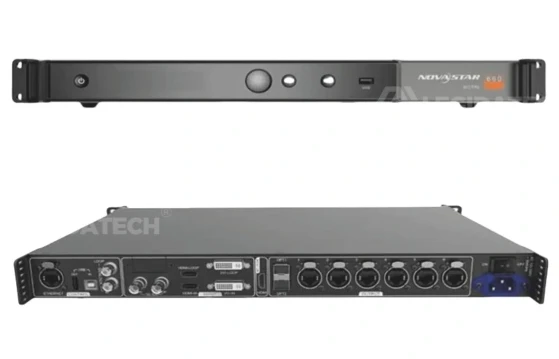
Live Broadcast & OB Vans
Native 3G-SDI connects directly to broadcast cameras and production switchers over BNC — no HDMI-to-SDI converters. GENLOCK ensures all LED walls in a multi-camera studio remain tear-free. Sub-1-frame latency keeps the wall in lip-sync with the presenter. SDI LOOP feeds additional monitors without external distribution amplifiers. See LED screen for events.
XR Virtual Production
GENLOCK frame-accurate synchronization with Unreal Engine-powered LED volumes eliminates motion-to-photon delay. Fiber outputs eliminate ground loops between the video server rack and the LED volume wall. 12-bit 4:4:4 color depth and RGB independent gamma ensure camera-facing displays reproduce accurate colors without banding — critical when the LED wall is the primary light source and background for filmed talent.
Large-Scale Rental & Touring
6 Ethernet ports + 2 fiber outputs handle complex multi-cabinet stage topologies. Fiber Converter mode eliminates the need for external media converters — one less device to rig, power, and troubleshoot. One-click backup and restore saves complete configurations, enabling instant recovery if a unit fails mid-show. Cascading up to 8 units supports massive pixel counts.
Sports Venues & Stadiums
Fiber transmission runs up to 10 km from the control room to distributed perimeter boards, scoreboards, and replay screens — all immune to the electromagnetic interference from stadium lighting dimmer racks and motor controllers. GENLOCK ensures every display in the venue refreshes in perfect synchronization with the broadcast feed.
Corporate Events & Keynotes
Multi-source switching between presenter laptop (HDMI), backup media server (DVI), and live camera feed (3G-SDI) — all managed from the front panel or V-Can software. Image mirroring supports creative stage designs with inverted or rotated LED panels. 10 user-definable presets enable instant transitions between event segments.
Command & Control Centers
24/7 continuous operation rated at –20°C to +60°C ambient. Ethernet port backup ensures no single cable failure takes down a monitoring wall. Web-based screen configuration enables remote management of distributed displays across multiple floors or buildings. Pixel-level calibration maintains color uniformity across video wall segments as panels age.
Product Gallery – Novastar MCTRL660 PRO
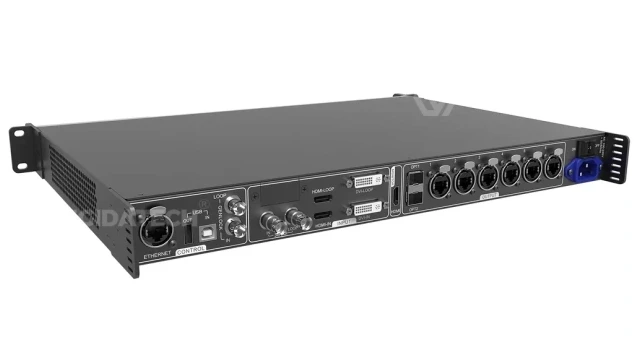
Novastar MCTRL660 PRO Device Overview
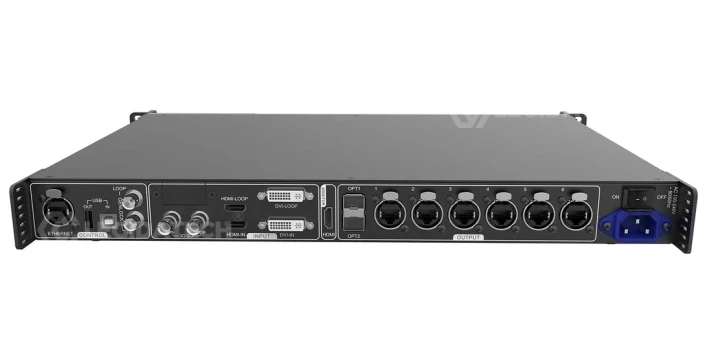
Novastar MCTRL660 PRO Front Input Output Ports
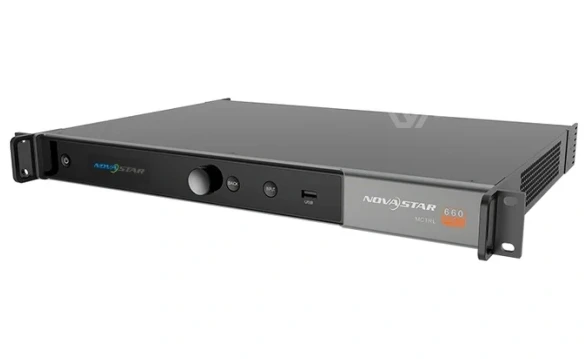
Novastar MCTRL660 PRO Connector Port Layout
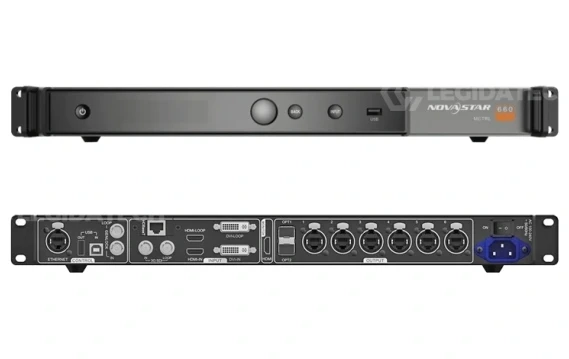
Novastar MCTRL660 PRO Video Input Ports Detail
Novastar MCTRL660 PRO Price & Sourcing
CE, FCC, IC, CB, RoHS certified. Each unit includes full accessories (power cord, HDMI cable, HDMI-to-DVI cable, USB cable, Ethernet cable, DAC cable, Quick Start Guide, Safety Manual, Certificate of Approval). Always verify serial number authenticity via NovaStar’s official website or NovaLCT software when sourcing — buy from authorized LED screen manufacturer channels to avoid counterfeit units.
Frequently Asked Questions
Q: What does 3G-SDI enable that HDMI/DVI cannot?
3G-SDI (SMPTE ST 424/292/259) provides three advantages over HDMI/DVI in professional LED wall applications. First, cable reliability: BNC bayonet connectors rated for 1,000+ mate/demate cycles versus HDMI’s friction-fit ~200 cycles. Second, cable length: RG6 coaxial supports 1080p60 up to 100 meters without repeaters — HDMI is limited to 5–10 meters. Third, embedded data: SDI carries up to 16 channels of 48kHz/24-bit audio, timecode, closed captioning, and metadata in a single cable. SDI is also HDCP-free — no handshake issues with professional broadcast equipment that HDMI frequently causes.
Q: When is GENLOCK required?
GENLOCK is required when the LED wall is filmed by a camera synchronized to an external reference signal. Without GENLOCK, the LED controller refreshes at its own clock rate and the camera captures at its own — the drift between these two clocks produces horizontal tear lines that scroll through the recorded image. GENLOCK slaves the controller’s frame timing to the camera’s sync signal (bi-level, tri-level, or black-burst from a master sync generator). This is mandatory for: multi-camera live broadcast studios, XR virtual production with camera tracking, and any event where the LED wall appears in the broadcast feed or recorded footage.
Q: How far can the fiber outputs transmit?
Up to 10 km with single-mode fiber (OS1/OS2, 9/125µm, LC connector, 1310 nm wavelength) using standard 10G SFP+ LR optical modules. Multi-mode fiber (OM3/OM4, 50/125µm, 850 nm) reaches up to 300 m. Fiber is immune to electromagnetic interference and ground loops — essential for outdoor stages near dimmer racks, stadiums with high-voltage lighting, and any venue where the controller rack must be located in a separate building from the LED wall.
Q: MCTRL660 PRO vs standard MCTRL660 — which should I buy?
Ask three questions. Does your signal chain include broadcast cameras or switchers with SDI output? If yes → PRO (native SDI eliminates external converters). Is the cable run from controller to first cabinet longer than 100 meters? If yes → PRO (fiber output required; copper Ethernet cannot span the distance). Is the LED wall filmed by cameras synchronized to an external reference? If yes → PRO (GENLOCK is non-negotiable). If the answer to all three is no → the standard MCTRL660 is the correct choice. It delivers equivalent core video quality and pixel capacity at approximately half the cost.
Q: Can MCTRL660 PRO be cascaded with standard MCTRL660 units?
Not recommended. Different internal processing latencies between the PRO (<1 frame in low latency mode) and the standard MCTRL660 (standard latency) create timing discrepancies in synchronized systems. Use identical MCTRL660 PRO units throughout any cascaded system — especially when GENLOCK is active. Up to 8 MCTRL660 PRO units can be cascaded via USB IN/OUT for synchronized multi-controller deployments.
Q: What software works with MCTRL660 PRO?
Three NovaStar tools. NovaLCT — main configuration software for screen mapping, Ethernet port settings, pixel-level calibration, and firmware updates; use Advanced Synchronous System User Login to unlock full features. V-Can — real-time on-site control for input source switching, layer management, preset loading, and monitoring. VNNOX Care — cloud-based remote monitoring platform for multi-venue deployments. All three are free downloads from NovaStar’s official website.
Q: What’s included in the box when I buy from LEGIDATECH?
Every MCTRL660 PRO order includes: 1× power cord, 1× HDMI cable, 1× HDMI-to-DVI cable, 1× USB cable, 1× Ethernet cable, 1× DAC cable, 1× Quick Start Guide, 1× Certificate of Approval, 1× Safety Manual, and 1× Customer Letter. Flight case packaging is available for an additional fee. All units undergo 48-hour burn-in testing before shipment and include a 3-year manufacturer-backed warranty.
Q: How do I verify my MCTRL660 PRO is a genuine NovaStar product?
Every genuine MCTRL660 PRO has a unique serial number (SN) and QR code label on the rear panel. Verify authenticity via NovaStar’s official website (novastar.tech) or within the NovaLCT software under Device Information. Counterfeit controllers often lack the QR code, have mismatched SN formats, or fail to be recognized by NovaLCT. All LEGIDATECH units are sourced directly from NovaStar-authorized distribution channels with full traceability documentation.
Novastar MCTRL660 PRO: The Rental Company’s ROI Analysis — Why This Controller Pays for Itself in Under 12 Months
When rental company owners evaluate the Novastar MCTRL660 PRO, the conversation almost always starts with the price difference. At roughly double the cost of a standard MCTRL660, the PRO prompts a fair question: “What exactly am I paying for, and will I earn it back?” This article answers that question with real operational cost data — not marketing claims, but measurable savings in equipment, labor, and risk reduction that rental companies and system integrators can verify against their own project P&Ls.
The Real Cost of a Controller: Total Cost of Ownership Over 3 Years
The purchase price of an LED controller is a fraction of what it actually costs to own and operate. For a rental company, the total cost of ownership (TCO) over a 3-year service life includes:
The math is counterintuitive but clear: the MCTRL660 PRO’s higher purchase price is offset — and then some — by the elimination of external converters, reduced rack complexity, faster troubleshooting, and the Fiber Converter mode that saves $200–$400 per fiber link. Over a 3-year service life, the PRO is typically 20–35% cheaper to own than a standard MCTRL660 with external converters. For a rental company deploying 4–6 controllers across multiple events, the annual savings exceed $1,000.
Fiber Converter Mode: The $200–$400 Hidden Saving Per Deployment
Every rental crew that has deployed an LED wall more than 100 meters from the control position knows the pain of fiber media converters. You need two of them (one at each end), they require separate power supplies, they add two more points of failure in the signal chain, and they occupy additional rack space — which matters when you’re building a flight case for touring. The MCTRL660 PRO’s Fiber Converter mode eliminates this entire layer. The controller itself performs optical-to-electrical conversion: OPT1 receives the fiber signal from the control room, and the 6 Ethernet ports distribute it to the LED cabinets.
The direct savings are $200–$400 per fiber link (the cost of a quality pair of fiber media converters). But the operational savings are larger. During setup, the video engineer troubleshoots one device instead of three. During teardown, the crew packs one device instead of three. Over 20 events per year, the labor time saved by eliminating external converters typically recovers 8–12 hours of crew time — at rental labor rates of $50–$85/hour, that’s $400–$1,020 in annual labor savings. Per controller.
GENLOCK in Live Events: One Tear Line = One Lost Client
If you have ever watched a LED wall appear on a broadcast feed with a horizontal line scrolling through it, you have seen what happens when GENLOCK is absent. The tear line is invisible to the live audience — so the client doesn’t notice it during the event. But the client sees it immediately the next morning when reviewing the recorded footage. And that phone call — “Why does the screen look broken in the video?” — is the moment a rental company loses a repeat booking.
The cost of that lost booking varies by market, but for a mid-size rental company serving corporate events, a single lost repeat client typically represents $5,000–$25,000 in annual revenue. For broadcast rental companies, the number is higher — losing a single production company client can mean $30,000–$80,000 in annual bookings. The GENLOCK feature on the MCTRL660 PRO eliminates this risk by slaving the LED controller’s frame timing to the camera’s sync signal. The OLED display confirms “Genlock Locked” — and the recorded footage is free of artifacts. For the price difference between a standard MCTRL660 and the PRO ($300–$400), you eliminate a risk that costs 10–100× that amount.
12-bit Color: Why Your Corporate Clients Notice — and Your Broadcast Clients Demand It
8-bit processing produces 16.7 million colors. 12-bit processing produces 68.7 billion — a 4,096× increase in color expression. For a corporate event displaying a brand’s logo and marketing content, 8-bit is usually sufficient. But when a broadcast camera is pointed at the LED wall, 8-bit’s limitations become visible. Low-brightness gradients (sunset scenes, skin tones, dark product shots) exhibit banding — visible steps between adjacent shades that the camera captures and the broadcast engineer cannot fix in post.
The MCTRL660 PRO’s 12-bit 4:4:4 processing with independent RGB gamma adjustment addresses this at the hardware level. Each red, green, and blue channel can have its gamma curve independently adjusted to compensate for LED batch variations and panel aging. For rental companies serving broadcast clients, this feature is not a luxury — it is a technical requirement specified in most broadcast production contracts. For corporate rental companies, it is a differentiation point: “Our LED walls are camera-ready for your event recording and live stream.”
One-Click Backup: Insurance Against Show-Stopping Failures
LED controllers rarely fail — but when they do, it happens during a show. The MCTRL660 PRO provides two layers of protection. Ethernet port backup: if one RJ45 link drops (loose cable, damaged connector, port failure), the remaining ports continue driving the screen without interruption. Optical port backup: OPT2 mirrors or backs up OPT1’s output — if the primary fiber link fails, the backup takes over seamlessly. The one-click backup and restore function saves the complete configuration (cabinet mapping, calibration data, layer settings, all 10 presets) and recovers it instantly to a replacement unit.
The financial value of this redundancy is straightforward: the cost of a show-stopping LED wall failure. For a corporate keynote, that cost includes the client’s refund (typically 50–100% of the rental fee), plus the reputational cost of being the company whose screen went black. For a broadcast event, the cost includes potential breach-of-contract penalties. For touring productions, it includes the cost of delaying a show. The MCTRL660 PRO’s redundancy architecture reduces the probability of a single-point failure taking down the entire display from “possible” to “extremely unlikely.” The one-click restore function reduces the downtime from a controller replacement from 30–60 minutes to under 2 minutes. For a LED screen manufacturer supplying rental companies, recommending the PRO over the standard MCTRL660 is a risk-management decision, not an upselling tactic.
Factory-Direct vs Distributor: The Procurement Decision
The MCTRL660 PRO is available through three channels. Factory-direct ($650–$850/unit) from manufacturers like LEGIDATECH offers the lowest unit cost, with the trade-off of international shipping lead time (typically 5–7 business days via DHL/FedEx air freight). Authorized distributors ($900–$1,100/unit) provide local stock and warranty support — valuable for single-unit purchases but expensive at scale. Online retail ($1,100–$1,500/unit) offers the fastest delivery for urgent replacements but carries the highest markup and the highest risk of counterfeit units.
For rental companies purchasing 4+ units, the factory-direct channel saves $1,000–$2,600 compared to distributor pricing — enough to cover the cost of a spare unit. All LEGIDATECH units include 3-year warranty, 48-hour pre-shipment burn-in testing, and full traceability documentation. For maintenance planning guidance, see LED screen maintenance.
Conclusion: The 12-Month Payback
The Novastar MCTRL660 PRO is not the right controller for every deployment. If your rental business never touches broadcast cameras, never runs cable beyond 100 meters, and never has its LED walls filmed for recorded or streamed content — the standard MCTRL660 is the correct choice. But for the 15–20% of professional LED deployments that involve SDI signal chains, fiber-based long-distance transmission, or camera-to-wall synchronization, the MCTRL660 PRO is not an upgrade — it is the minimum viable equipment. And when the TCO analysis accounts for the elimination of external converters, reduced labor time, and the risk mitigation of GENLOCK and backup redundancy, the PRO’s higher purchase price typically pays for itself within 12 months of regular rental operation. The controller that costs more to buy is, paradoxically, the one that costs less to own. For B2B procurement from a verified source, contact a specialized LED screen manufacturer with NovaStar authorization and request a factory-direct quote with air freight delivery options.